Hugging Face has published a walkthrough that ships fine-tuning scripts and container images for adapting TRELLIS.2, a popular 3D generation model, to a user's own 3D assets. The same containers run locally or on Hugging Face Jobs. If a dataset has already been uploaded to the Hugging Face Hub, training can be launched with only a few arguments; the accompanying repository can also be modified directly. The post additionally explains how the training script works under the hood.
Background
3D generation serves robotics, simulation, media, and entertainment, where generated objects must obey strict rules and data representations must be standardized. The field is fragmented: file formats such as GLB and PLY coexist with representations such as neural radiance fields (NeRFs) and 3D Gaussian splatting (3DGS), each carrying its own advantages and disadvantages.
The original TRELLIS addressed this fragmentation with a unified latent representation; its decoders convert that representation into whichever output format is required, so separate models per format are unnecessary. The same team later released TRELLIS.2, which represents 3D structure more faithfully, but neither model ships with a simple mechanism for adapting it to a specific task.
The problem to solve
A general-purpose model like TRELLIS.2 can miss details that matter for a given application, for instance when a user needs precise geometry for furniture models. The experiment described in the post uses a subset of the Google Scanned Objects (GSO) dataset containing 188 footwear objects. In the authors' initial tests, the pretrained model produced shoes that looked correct while getting the soles wrong; the experiment tests whether a LoRA can make the soles more accurate.
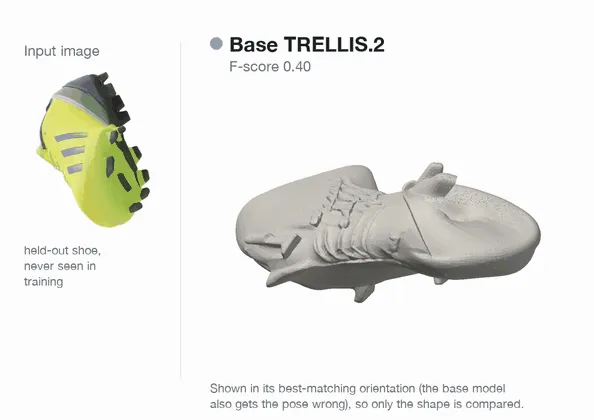
The stated goal is to improve TRELLIS.2 on a single object category using GSO, and to show which pipeline components should be fine-tuned and which left untouched. Because the pipeline separates structure, detailed geometry, and materials, only the components relevant to the task are trained. The authors emphasize that deciding what to freeze matters as much as deciding what to fine-tune.
Tooling
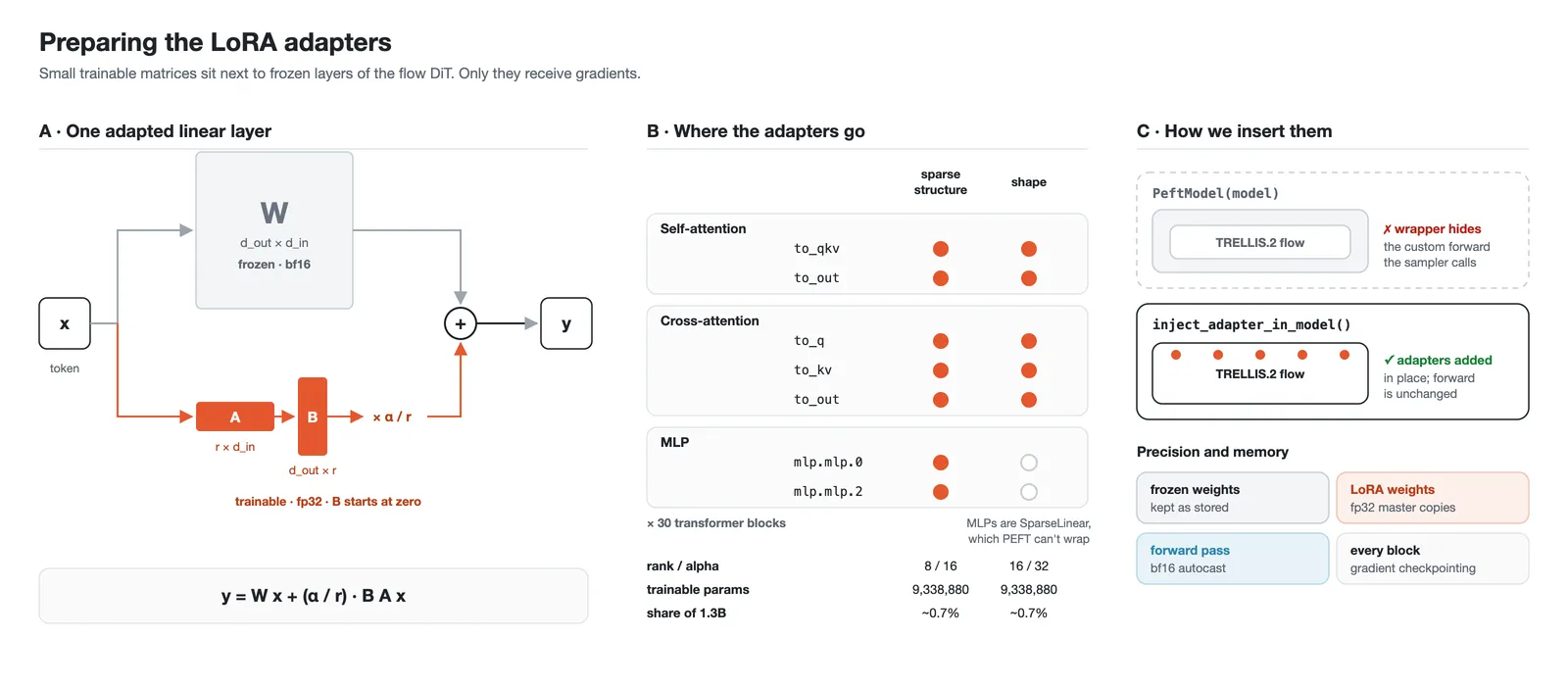
LoRA (low-rank adaptation) trains small adapter matrices while the original weights stay frozen, shrinking the number of trainable parameters and the memory required for gradients and optimizer state. Adapters are added and trained with Hugging Face's PEFT library.
Hugging Face Jobs executes containerized workloads on cloud hardware and is used for both preprocessing and training; local Docker commands are provided for using your own GPU instead. Prerequisites are a HF_TOKEN and a Hugging Face account with access to DINOv3, which is a gated model. Anyone using a custom dataset must upload its meshes to the Hub first.
How TRELLIS.2 works
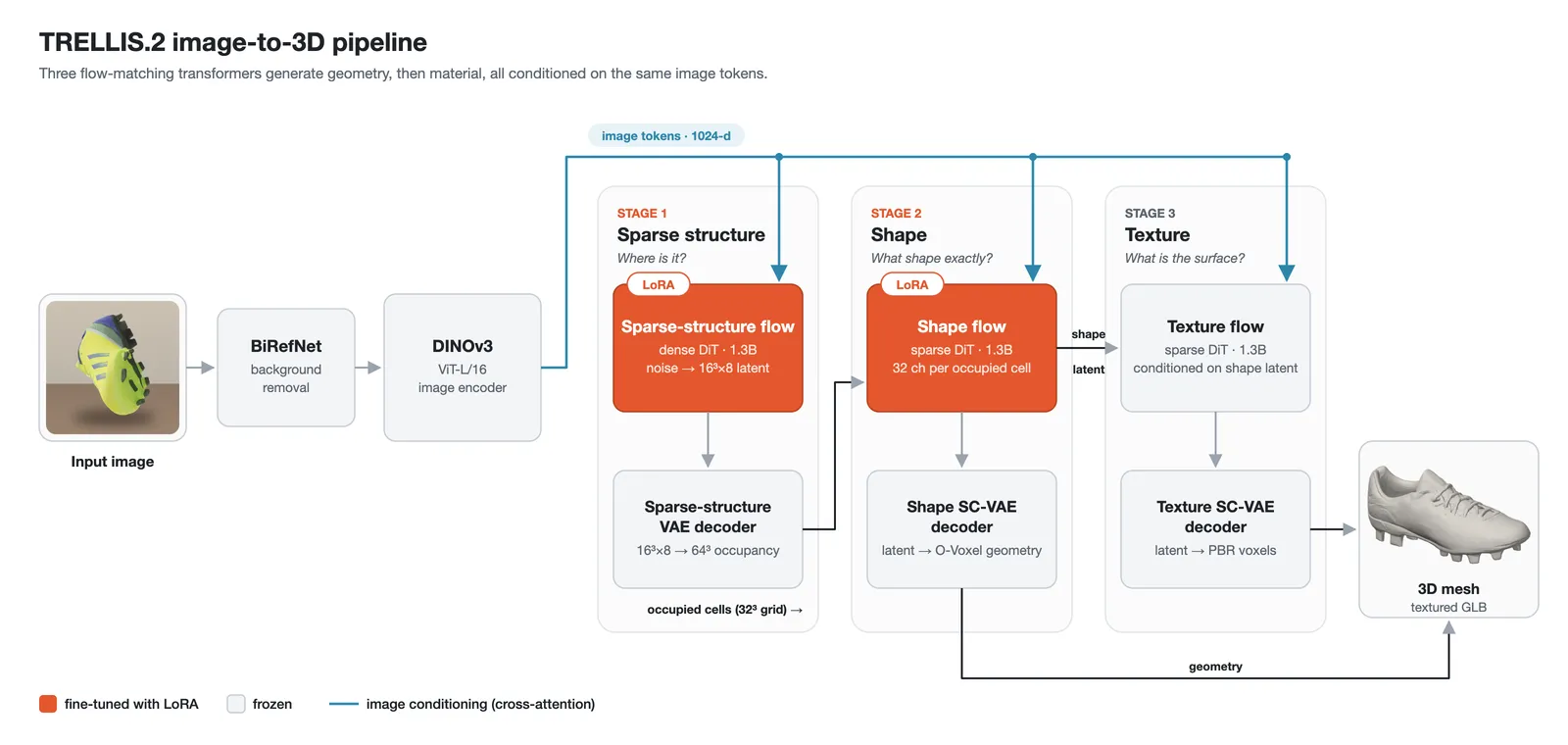
Before training, the post walks through the five main stages of the pipeline: removing the image background, encoding the image, predicting the coarse structure, generating detailed geometry, and generating materials, after which the result is exported as a textured mesh.
Encoding the input image
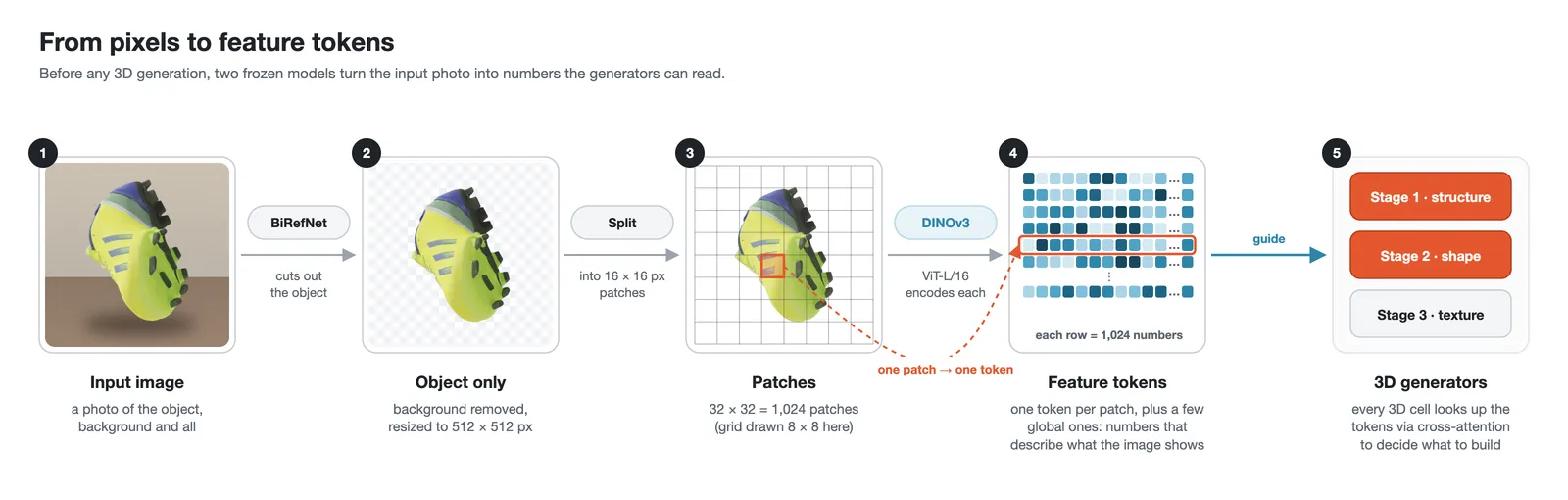
BiRefNet first removes the background from the input image. DINOv3-L then encodes the image into feature tokens, which the generation models use to guide the 3D object.
Sparse Structure Generation
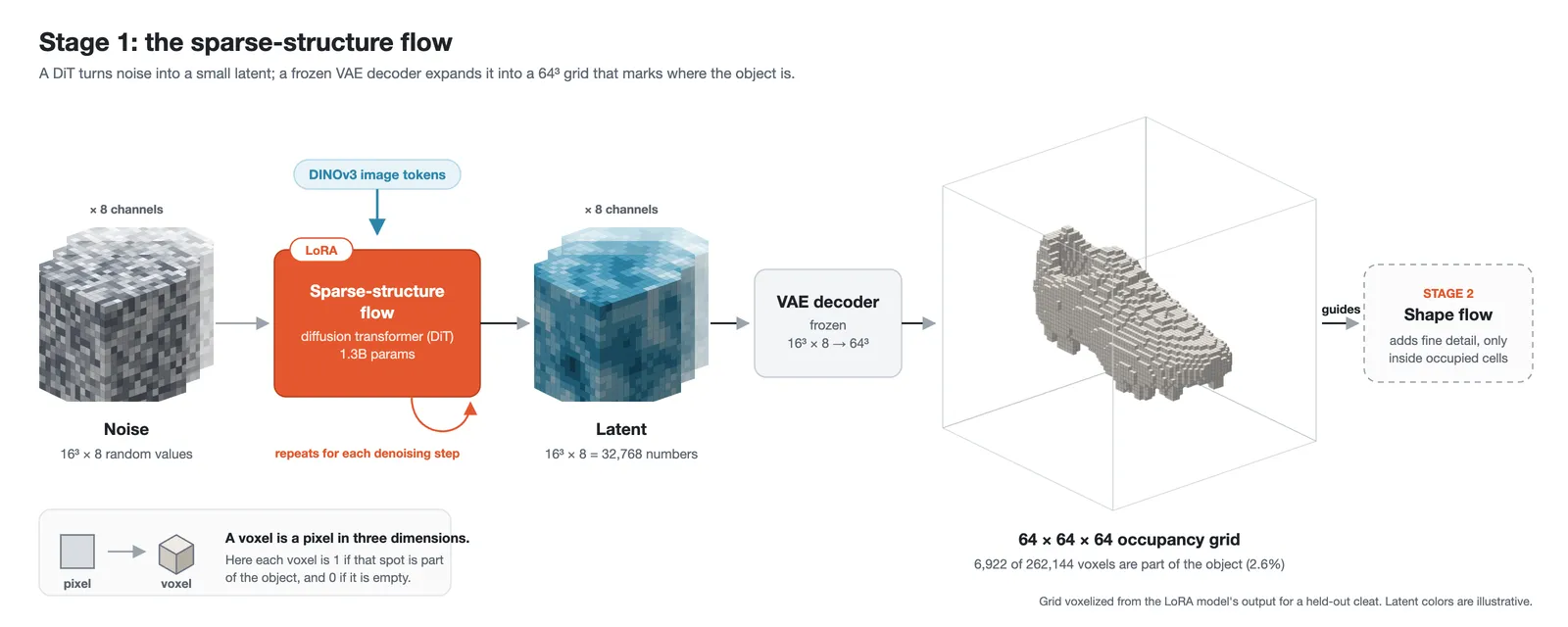
The sparse-structure flow DiT, a diffusion transformer, predicts the object's coarse shape as a small latent of size 16³ × 8. A variational autoencoder (VAE) decoder converts the latent into a 64 × 64 × 64 occupancy grid in which each voxel, a pixel in three dimensions, indicates whether that location belongs to the object. LoRA adapters are attached here because this stage's output guides the geometry stage.
O-Voxel and Structured Latents
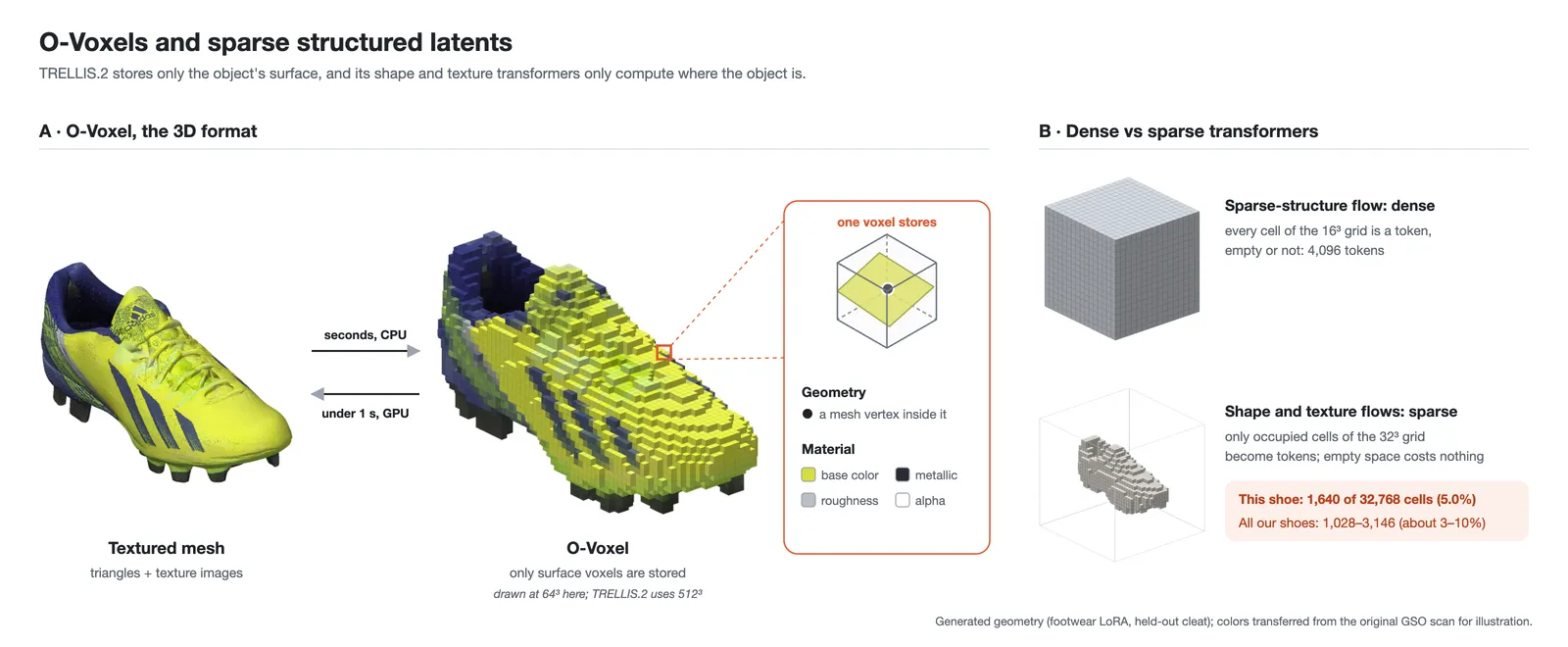
O-Voxel, the 3D format used by TRELLIS.2, is a sparse voxel grid that keeps only surface voxels; each stores local geometry, such as a mesh vertex, plus material attributes. Because the format is compact, a CPU converts a mesh into O-Voxel in seconds and a GPU converts it back in seconds.
Structured sparse latents, inherited from TRELLIS, hold 3D data in sparse tensors for faster computation. Only roughly 10% of grid voxels are used, so no compute is spent on empty space. Consequently the shape flow DiT and texture flow DiT are sparse transformers, whereas the sparse-structure flow DiT is a dense transformer.
Geometry Generation (Shape Flow)
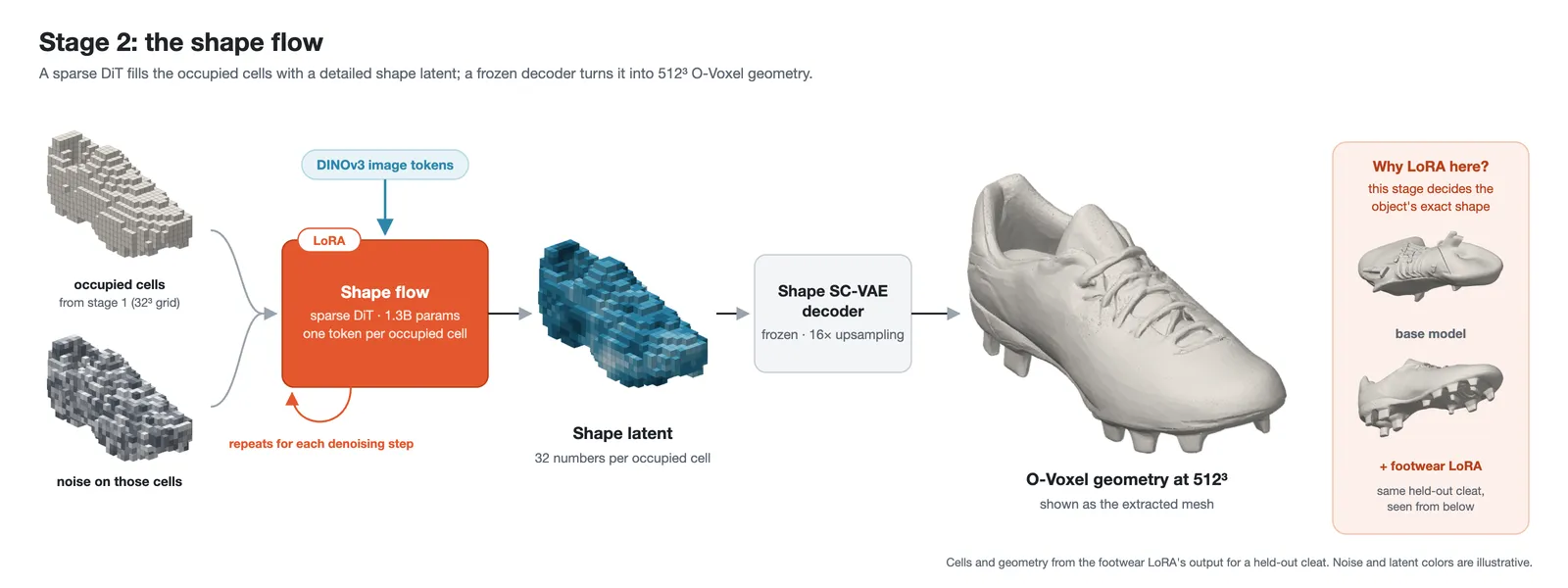
The shape flow DiT consumes the occupancy grid and the DINOv3 feature tokens to produce a latent, which a second VAE decoder turns into O-Voxel geometry at 512 × 512 × 512 resolution. LoRA adapters are added at this stage because it controls the object's shape.
Material Generation and Mesh Creation
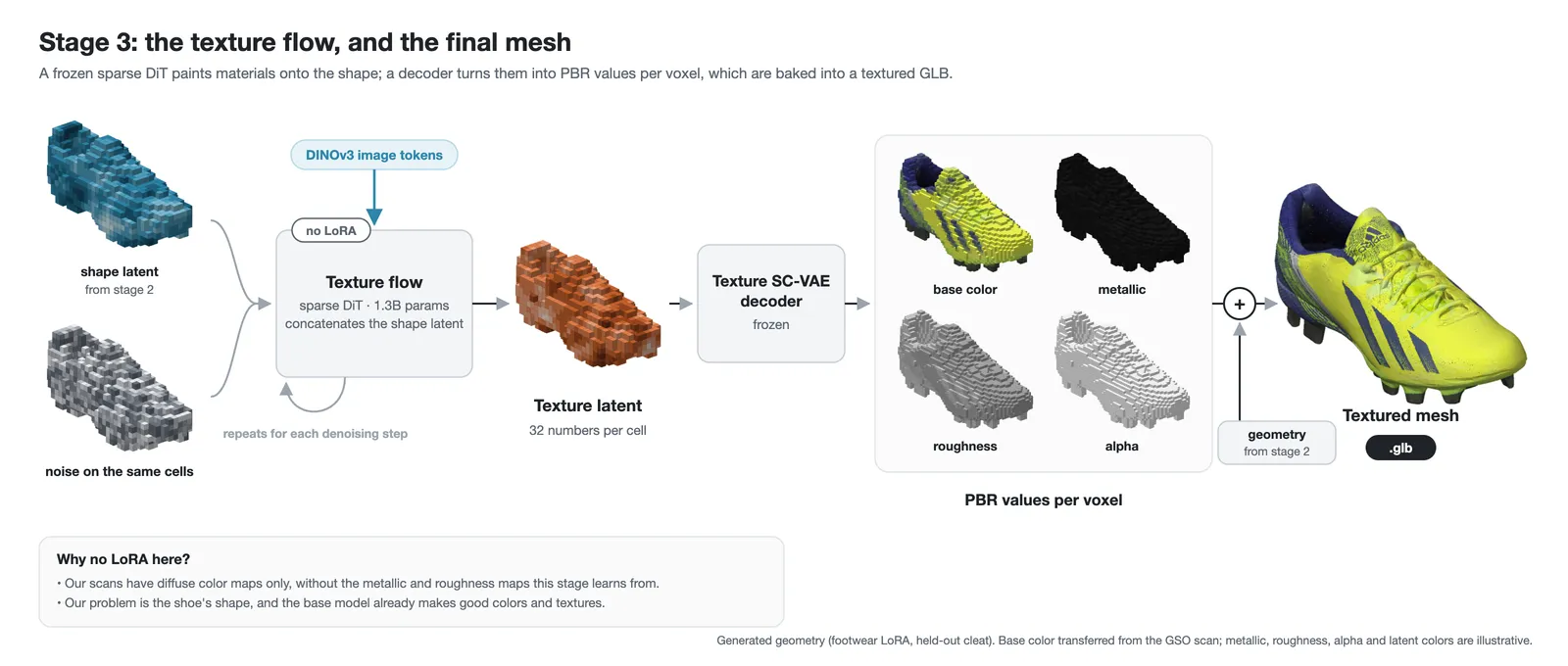
In the final stage the texture flow DiT takes the shape latent and DINOv3 features as input and determines the materials and textures of the surface; a VAE decoder produces base color, metallic, roughness, and alpha values for each voxel. No adapters are added here: the dataset provides diffuse color maps but lacks the separate material maps required to train this stage, the target problem concerns shoe shape, and the base model already generates good colors and textures. The pipeline then merges geometry and material attributes into a textured mesh and exports it as a GLB file.
Planning the fine-tune
Adapters are attached only to the sparse-structure flow DiT and the shape flow DiT, the two DiTs that control shape and geometry, while the texture flow DiT stays frozen to preserve its capabilities. The dataset's diffuse color maps contain baked lighting, so they are unsuitable training targets: training the texture DiT on them could teach it to render lighting as a surface property and could cause catastrophic forgetting of earlier learning.
The subset holds 188 shoes drawn from the 1,030 objects in GSO. At that scale LoRA is preferable to full fine-tuning, which is far costlier and risks overwriting the model's learned priors. The configuration trains about 9.3 million adapter parameters in total across both targeted DiTs: rank 8 adapters in the attention and feed-forward (MLP) layers of the sparse-structure flow DiT, and rank 16 adapters in the attention layers of the shape flow DiT. Rank controls adapter matrix size; a higher rank lets the adapter learn more.
What gets run
A 3D model setup can demand many dependencies, so two Docker images are supplied, one for preprocessing and one for fine-tuning, each runnable on Hugging Face Jobs or a local machine. The workflow is: grant the containers access to the data, set the task parameters, run the preprocessing container, then run the fine-tuning container, which trains the adapters and uploads them to the Hub.
The experiment has three parts: preparing the data (converting GLB or OBJ meshes into the latent representations TRELLIS.2 trains on and rendering the input images), training the adapters (one job per DiT using the prepared dataset and a LoRA configuration), and explaining the code that loads data, inserts adapters, and trains the models. The preprocessed dataset is saved so every training run can reuse it.
Running on Hugging Face Jobs
Preprocessing
The preprocessing container renders 16 views of each object with Blender running headless through the xvfb-run utility; those views become conditioning images for LoRA training. It also passes every object through the preprocessing pipeline. For the 188 objects, the full run took roughly 1 hour on an a100-large job. An example intermediate output is published as a footwear dataset, and a compact version of the preprocessing pipeline lives in a companion repository.
export HF_TOKEN=hf_xxx
# Replace your-username with your Hugging Face username
hf jobs run -d --flavor a100-large --timeout 6h --secrets HF_TOKEN \
  cr.hf.co/suvadityamuk/trellis2-finetuning-prep:latest \
  trellis2-prep \
    --meshes your-username/my-meshes \
    --push-to your-username/my-meshes-trellis2 \
    --private --holdout 0.05 \
    --views 16 --workers 8
Key flags for Hugging Face Jobs:
| flag | meaning |
|---|---|
| -d | Detach: print the job ID and URL, then return; follow the job with hf jobs logs -f |
| --flavor a100-large | The hardware; a100-large provides 80 GB, and hf jobs hardware lists all options |
| --timeout 6h | The job stops after this time; both commands resume, with preprocessing skipping finished objects and training continuing from the newest checkpoint in --push-to |
| --secrets HF_TOKEN | Sends the token (from HF_TOKEN or hf auth login) to the job as an encrypted environment variable; it is not written into the image |
| cr.hf.co/...:latest | The image to run; everything after it is the command executed inside the container |
The container accepts further arguments, documented separately, that apply whether it runs on Jobs or with Docker.
LoRA fine-tuning
The training container loads the prepared dataset plus a configuration preset or file, and records training metrics with Trackio, whose dashboard is used to monitor the run. Two modes exist: 'ss' fine-tunes only the Sparse-Structure Flow DiT and 'shape' fine-tunes only the Shape Flow DiT; internally each simply references a different config.json.
export HF_TOKEN=hf_xxx  # Replace your-username with your Hugging Face username
hf jobs run -d --flavor a100-large --timeout 12h --secrets HF_TOKEN \
  cr.hf.co/suvadityamuk/trellis2-finetuning-train:latest \
  trellis2-train --config ss \
    --latents your-username/my-meshes-trellis2 \
    --push-to your-username/my-trellis2-lora \
    --run-name ss_lora \
    --push-path ss_lora \
    --trackio-space your-username/trellis2-trackio

hf jobs run -d --flavor a100-large --timeout 12h --secrets HF_TOKEN \
  cr.hf.co/suvadityamuk/trellis2-finetuning-train:latest \
  trellis2-train --config shape \
    --latents your-username/my-meshes-trellis2 \
    --push-to your-username/my-trellis2-lora \
    --run-name shape_lora \
    --push-path shape_lora \
    --trackio-space your-username/trellis2-trackio \
    --set max_steps=3000 i_save=500
Setting --push-to makes the container upload adapter checkpoints to the Hub. To fine-tune on the already-processed dataset the authors published, point --latents at suvadityamuk/gso-footwear-trellis2-latents and push to your own repository:
export HF_TOKEN=hf_xxx
# Replace your-username with your Hugging Face username
# For the Sparse-Structure Flow DiT
hf jobs run -d --flavor a100-large --timeout 12h --secrets HF_TOKEN \
  cr.hf.co/suvadityamuk/trellis2-finetuning-train:latest \
  trellis2-train \
    --config ss \
    --latents suvadityamuk/gso-footwear-trellis2-latents \
    --push-to your-username/trellis2-footwear-lora \
    --run-name ss_lora \
    --push-path ss_lora \
    --trackio-space your-username/trellis2-trackio \
    --set max_steps=3000 i_save=500
# For the Shape Flow DiT
hf jobs run -d --flavor a100-large --timeout 12h --secrets HF_TOKEN \
  cr.hf.co/suvadityamuk/trellis2-finetuning-train:latest \
  trellis2-train \
    --config shape \
    --latents suvadityamuk/gso-footwear-trellis2-latents \
    --push-to your-username/trellis2-footwear-lora \
    --run-name shape_lora \
    --push-path shape_lora \
    --trackio-space your-username/trellis2-trackio \
    --set max_steps=3000 i_save=500
Running locally with Docker
The commands and flags are the same as for Hugging Face Jobs; only the Docker options differ.
# For preprocessing into latents
docker run --gpus all --rm --shm-size 16g -e HF_TOKEN=hf_xxx \
  -v hf-cache:/root/.cache/huggingface -v "$PWD/work":/workspace/work \
  cr.hf.co/suvadityamuk/trellis2-finetuning-prep:latest \
  trellis2-prep --meshes your-username/my-meshes --push-to your-username/my-meshes-trellis2
# For Sparse-structure Flow DiT
docker run --gpus all --rm --shm-size 16g \
  -v hf-cache:/root/.cache/huggingface -v "$PWD/work":/workspace/work \
  cr.hf.co/suvadityamuk/trellis2-finetuning-train:latest \
  trellis2-train --config ss --latents your-username/my-meshes-trellis2 \
    --push-to your-username/my-trellis2-lora --trackio-space your-username/trellis2-trackio
# For Shape Flow DiT
docker run --gpus all --rm --shm-size 16g \
  -v hf-cache:/root/.cache/huggingface -v "$PWD/work":/workspace/work \
  cr.hf.co/suvadityamuk/trellis2-finetuning-train:latest \
  trellis2-train --config shape --latents your-username/my-meshes-trellis2 \
    --push-to your-username/my-trellis2-lora --trackio-space your-username/trellis2-trackio
To use the already-preprocessed dataset locally:
export HF_TOKEN=hf_xxx  # Replace your-username with your Hugging Face username
# For Sparse-structure Flow DiT
docker run --gpus all --rm --shm-size 16g -e HF_TOKEN \
  -v hf-cache:/root/.cache/huggingface \
  -v "$PWD/work":/workspace/work \
  cr.hf.co/suvadityamuk/trellis2-finetuning-train:latest \
  trellis2-train \
    --config ss \
    --latents suvadityamuk/gso-footwear-trellis2-latents \
    --push-to your-username/trellis2-footwear-lora \
    --trackio-space your-username/trellis2-trackio \
    --set max_steps=3000 i_save=500
# For Shape Flow DiT
docker run --gpus all --rm --shm-size 16g -e HF_TOKEN \
  -v hf-cache:/root/.cache/huggingface \
  -v "$PWD/work":/workspace/work \
  cr.hf.co/suvadityamuk/trellis2-finetuning-train:latest \
  trellis2-train \
    --config shape \
    --latents suvadityamuk/gso-footwear-trellis2-latents \
    --push-to your-username/trellis2-footwear-lora \
    --trackio-space your-username/trellis2-trackio \
    --set max_steps=3000 i_save=500
The trained LoRA adapters are published in the repository suvadityamuk/trellis-2-finetune-gso.
Inside the training pipeline
Preprocessing into latents
TRELLIS.2's frozen encoders convert the input meshes into training latents, which are saved so later runs do not have to encode the meshes again. Sixteen views per object are rendered in Blender, and during training one random view per sample serves as the conditioning image. Nine of the 188 objects are held out for evaluation and the other 179 are used for training, so the held-out objects reveal whether the adapters generalize to objects the model never saw during training.
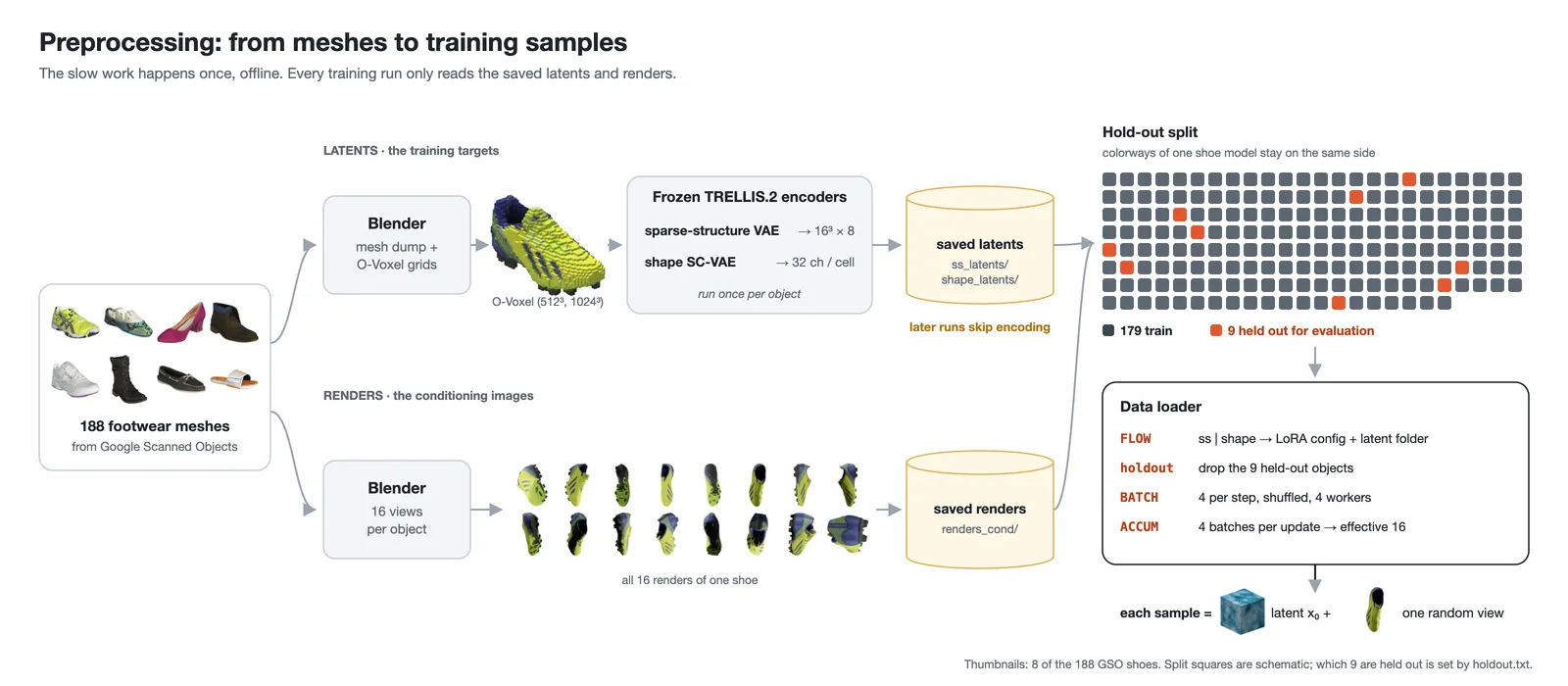

The setup code selects the flow DiT via FLOW ('ss' or 'shape'), sets the number of optimizer steps via STEPS, loads the LoRA config file for the chosen DiT (configs/lora/ss_flow_lora_gso.json or configs/lora/slat_flow_img2shape_lora_gso.json), builds the dataset in the TRELLIS.2 format from the stored latents (ss_latents/ss_enc_conv3d_16l8_fp16_64 or shape_latents/shape_enc_next_dc_f16c32_fp16_512), removes the held-out objects, and constructs the data loader. A batch size of 4 with 4 gradient-accumulation steps yields an effective batch size of 16.
Preparing LoRA adapters
The peft library inserts the LoRA adapters into the selected layers. Because TRELLIS.2 uses a custom forward pass, the standard PeftModel() wrapper cannot be used; instead, inject_adapter_in_model() attaches the adapters directly while preserving the model's custom interface. Trainable adapter weights are kept in 32-bit floating point (fp32) for numerical stability while the forward pass uses bfloat16 (bf16) autocasting, which lowers memory use for some operations without changing how the frozen backbone weights are stored. Gradient checkpointing is enabled on each block via block.use_checkpoint = True.
Training
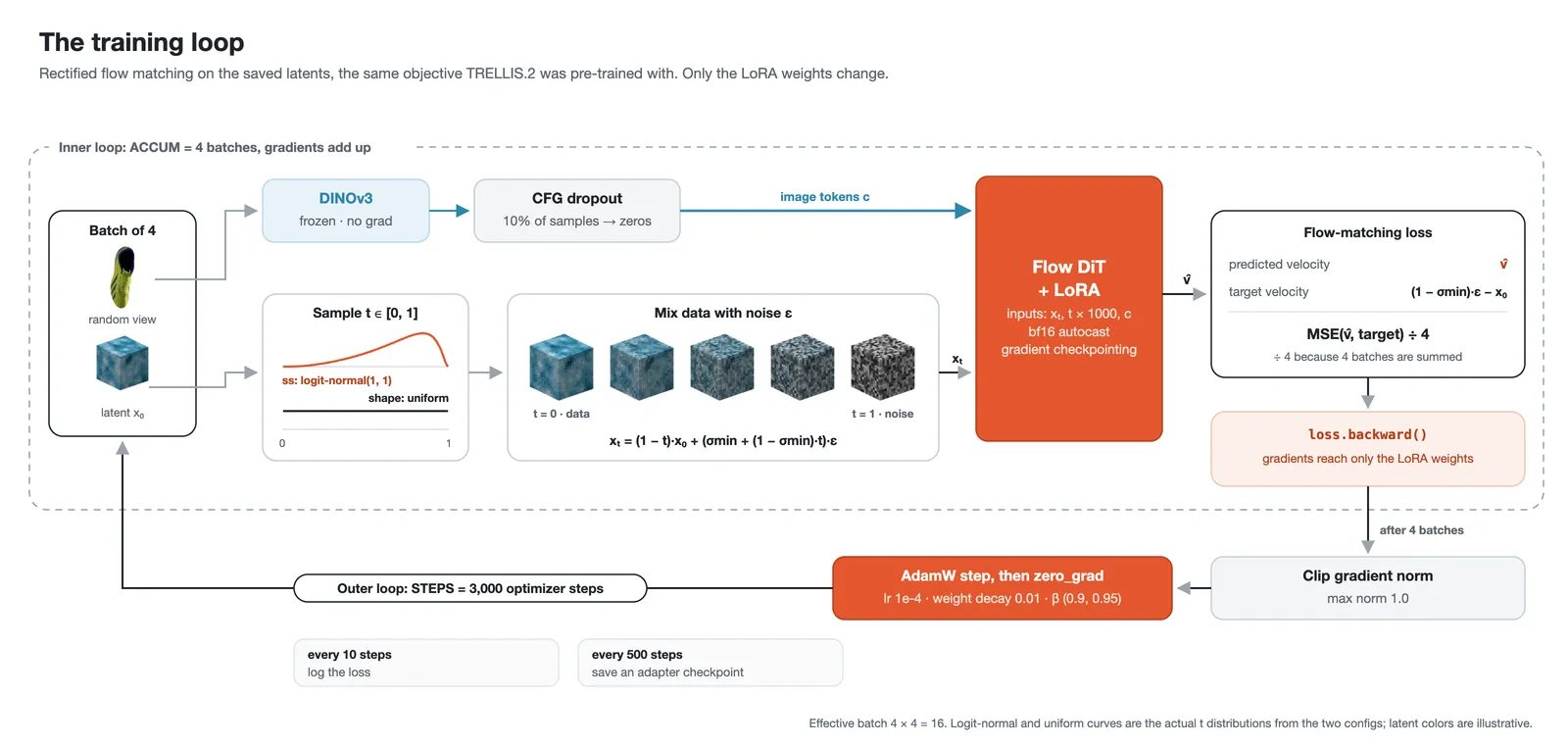
The objective is rectified flow matching, the same objective TRELLIS.2 used during pretraining and one also seen in image generators such as Stable Diffusion 3 and Flux 2, making it a natural choice for fine-tuning. Only the LoRA parameters in the two DiTs are updated; every original weight remains frozen.
The optimizer is AdamW with betas (0.9, 0.95), and a DINOv3 feature extractor encodes the conditioning images. Inside the loop, a timestep t is sampled per element (logitNormal for the sparse-structure flow DiT and uniform for the shape flow DiT, per the TRELLIS.2 config), random noise matching the data shape is generated, the clean data is mixed with noise according to t (where t = 0 means nearly clean data and t = 1 pure noise), and the model predicts velocity at t multiplied by 1000 to match pretraining conditions. The loss is the mean squared error between the predicted velocity and the target velocity, the derivative of x_t.
Each optimizer step accumulates gradients over 4 batches before updating. For every batch, DINOv3 encodes the conditioning image, and classifier-free guidance (CFG) dropout zeroes the conditioning for a random fraction p_uncond of the samples. The flow-matching loss is computed under bf16 autocasting; afterwards gradients are clipped to prevent very large updates, the optimizer steps, the loss is logged every 10 steps, and an adapter checkpoint is saved every 500 steps.
Results
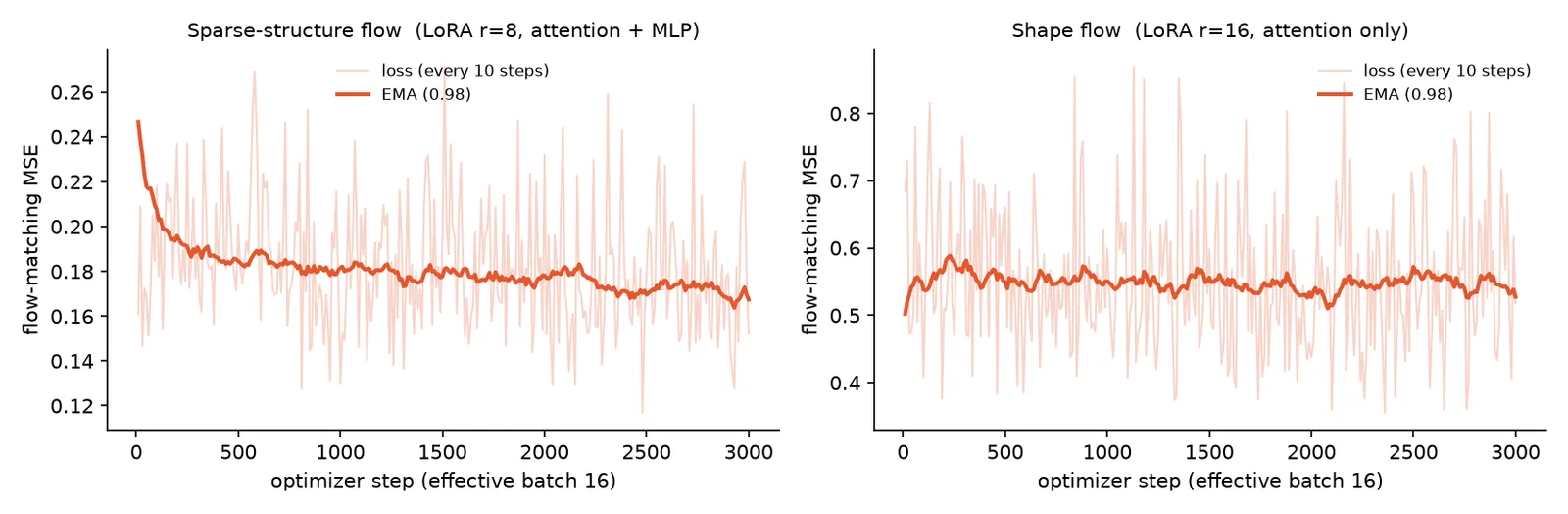
Two adapters were trained, one per DiT, using the LoRA config files bundled in the container image (ss_flow_lora_gso.json and slat_flow_img2shape_lora_gso.json). Each run used a single A100 80 GB on Hugging Face Jobs: 7.2 hours for the sparse-structure run and 3.6 hours for the shape run.
The sparse-structure training loss drops quickly at first and then more slowly, while the shape loss stays roughly level. The curves describe the training objective rather than output quality: flow-matching loss varies with the sampled objects, noise, and timesteps, so verifying improved geometry requires comparing outputs on the held-out objects.
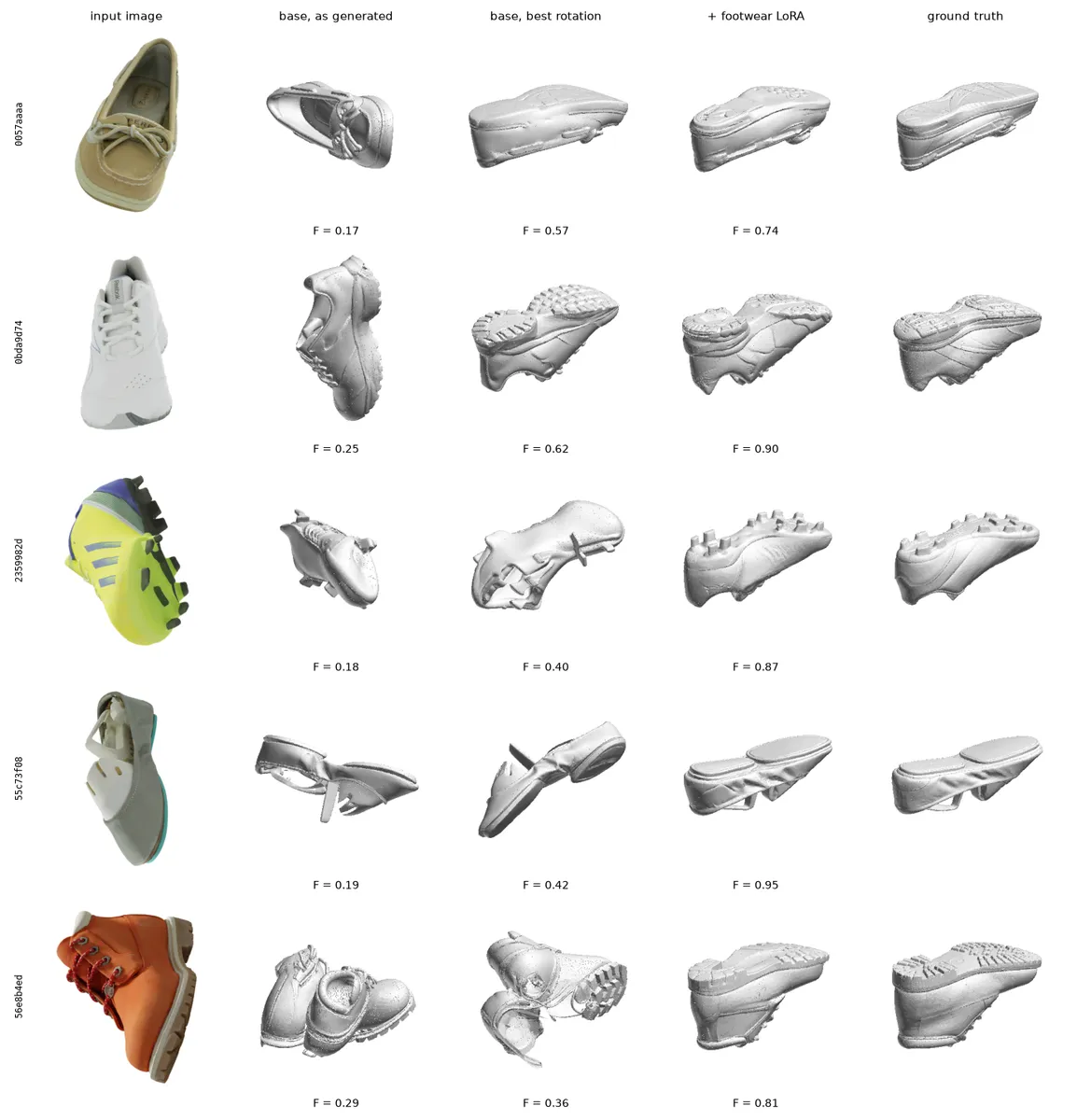
A comparison figure covers five of the nine held-out objects, showing the input image, the base model's output, the base output after a rotation adjustment, the output with the footwear adapters, and the reference scan. In these examples the fine-tuned model's soles sit closer to the scans.
Three metrics evaluate the geometry on the test set:
- Chamfer distance: the distance from points on one surface to the nearest points on the other, measured in both directions; lower is better.
- F-score @ 0.02: the combination of precision (how much of the generated surface is near the reference) and recall (how much of the reference surface the generated surface covers), with the matching threshold at 2% of the scan's bounding-box diagonal; higher is better.
- Normal consistency: how closely the surface directions agree, a surface normal being the vector perpendicular to the surface; higher is better.
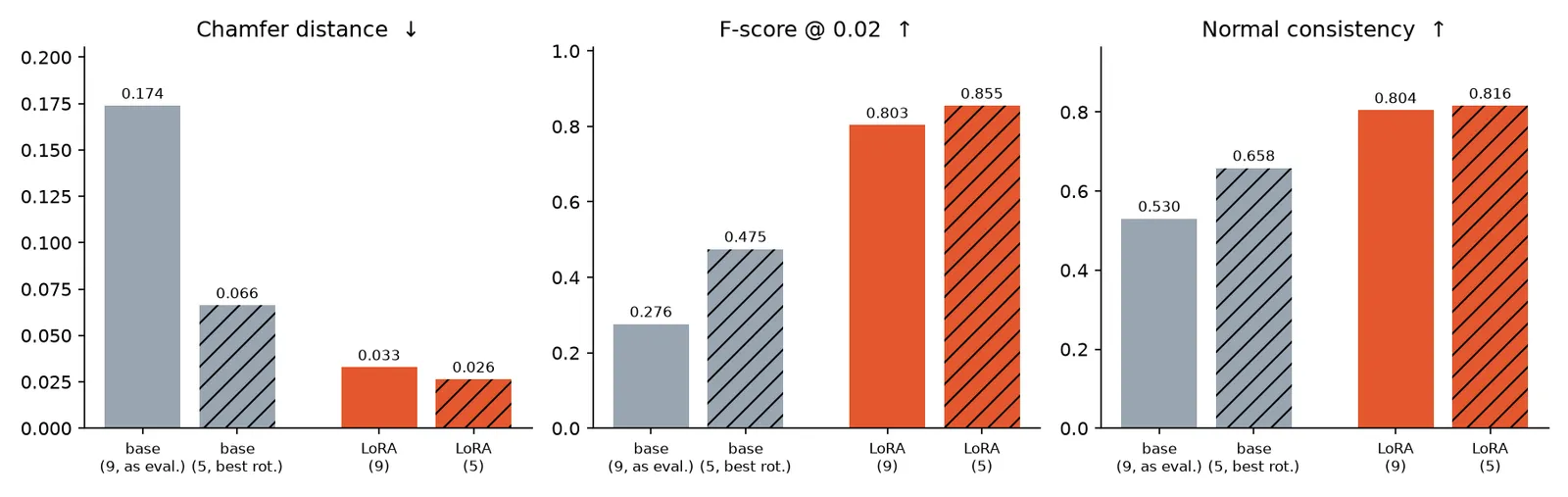
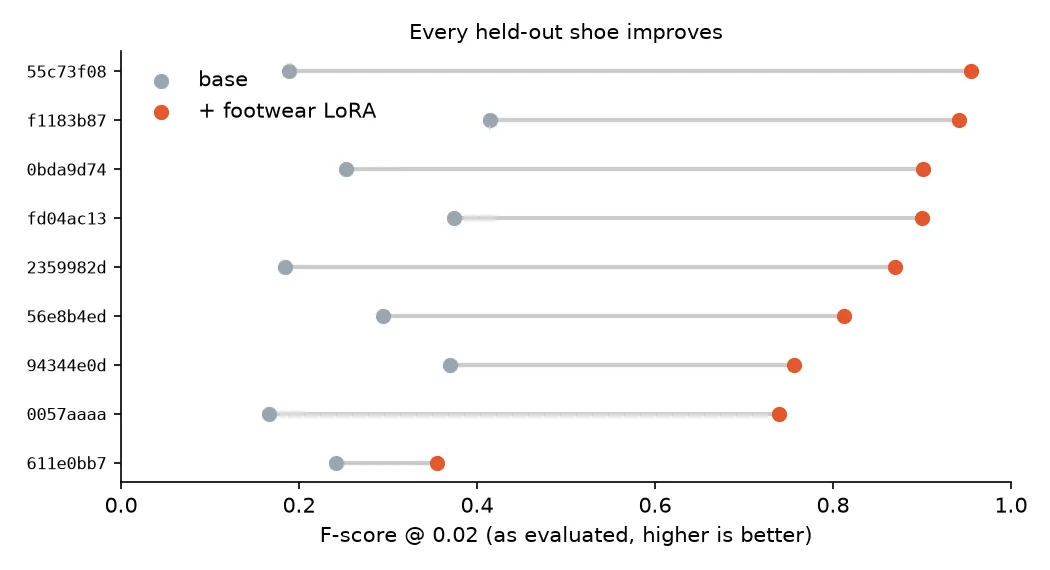
Across the nine-object comparison, the base model's mean F-score is 0.276 versus 0.803 with the footwear adapters; Chamfer distance drops from 0.174 to 0.033 and normal consistency rises from 0.530 to 0.804. With both adapters, the F-score improves on all nine held-out objects. Full statistics for all runs are available in the authors' Trackio space.
Future directions
The main lesson, per the authors, is to choose a training target consistent with both the problem and the data at hand; in this case, the structure and shape stages were fine-tuned while the texture stage stayed frozen. Named next steps include testing whether the same choices transfer to other 3D generation models such as Pixal3D and UniLat3D, and to Gaussian-splat and world-generation models such as HunyuanWorld 2.0 and NVIDIA Lyra 2.0, whose representations and training pipelines may require different methods.