Developers want AI coding assistants that require almost no setup. Pairing a large language model (LLM) gateway with LiteLLM lets them reach the foundation models (FMs) hosted on Amazon Bedrock quickly, while the organization gains visibility into and control over that usage. Platform teams have to track latency and errors, finance teams have to attribute inference spending to teams and projects, and security teams need uniform access controls. An LLM gateway can address these requirements by acting as a centrally managed entry point to the models behind coding assistants.
This post demonstrates how to assemble a self-service LLM gateway from Amazon Bedrock Application Inference Profiles and LiteLLM running on AWS Fargate, which hides Amazon Bedrock behind an OpenAI-compatible API. Under this pattern, developers reach foundation models through a single API with a dedicated key, and the organization receives per-user cost controls plus observability into model performance. The walkthrough relies on illustrative snippets and AWS Cloud Development Kit (AWS CDK) constructs rather than one complete deployable stack, and by the end readers should understand the pattern well enough to build their own version. Claude Sonnet and Claude Haiku appear as example models; for the current list of models and their availability by AWS Region, see "Supported models by AWS Region" in the Amazon Bedrock documentation.
The request path is straightforward: traffic flows from the developer, through the LiteLLM layer, and onward to Amazon Bedrock and the underlying foundation model. The diagram below shows the production topology for that flow. The post does not cover adding Amazon Bedrock Guardrails such as content filtering and grounding, although appropriate responsible AI controls would normally be included before a production deployment.
A developer's OpenAI-compatible client reaches the gateway through Amazon Route 53, Amazon CloudFront, and an Application Load Balancer (ALB), then authenticates to LiteLLM on Fargate with a per-user API key. The request draws on Amazon Relational Database Service (Amazon RDS) for PostgreSQL to store virtual-key and spend state, and also touches Amazon ElastiCache for Valkey as a cache and AWS Secrets Manager for secrets. LiteLLM finally invokes Amazon Bedrock Application Inference Profiles under a scoped AWS Identity and Access Management (IAM) task role, while Amazon CloudWatch records requests per minute (RPM) and tokens per minute (TPM) metrics together with the quota alarm.
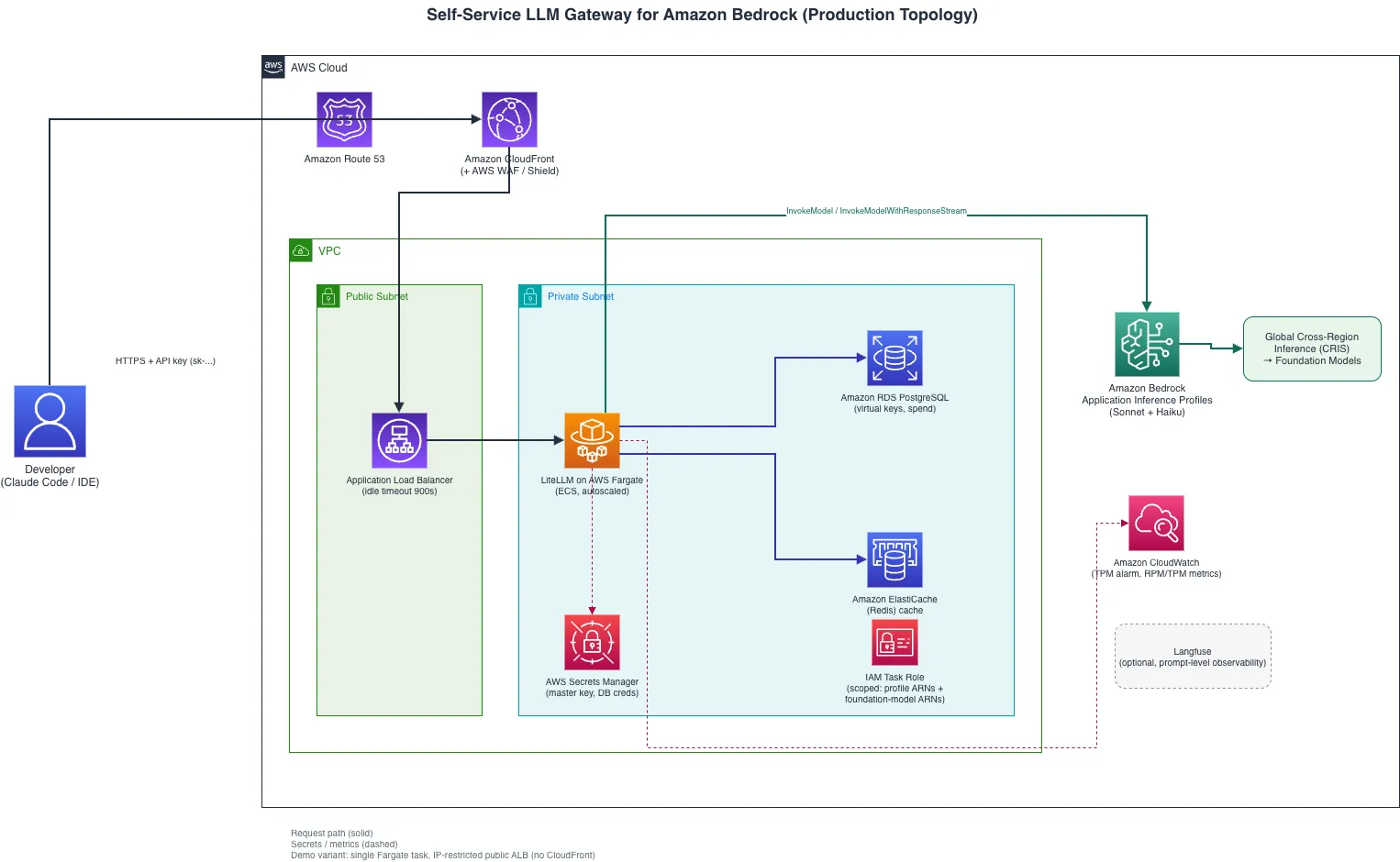
The core components:
LiteLLM on AWS Fargate. LiteLLM supplies a proxy that exposes an OpenAI-compatible API. It runs as an AWS Fargate task with target-tracking Auto Scaling on CPU utilization. Developers point their tools at this endpoint and never interact with Amazon Bedrock directly.
Self-service portal. LiteLLM ships a lightweight portal for administrator and developer self-service that can integrate with corporate single sign-on (SSO). Operations engineers use it to set the spend policy, and developers self-provision API keys within those limits.
Persistent and cache storage. LiteLLM uses Amazon ElastiCache for Valkey for non-persistent response caching and to coordinate rate limiting across Fargate tasks. A separate Amazon RDS (PostgreSQL) database serves as the system of record for persistent state such as API key metadata and spend tracking.
Amazon Bedrock Application Inference Profiles. Every model — for example Claude Sonnet and Claude Haiku — receives its own inference profile managed through AWS CDK, which delivers per-model quota isolation and a clean abstraction between LiteLLM's configuration and Amazon Bedrock model versioning.
Langfuse. Open source LLM observability providing prompt-level telemetry, latency tracking, and debugging; it adds application-level insight on top of CloudWatch's infrastructure metrics.
Because the gateway speaks an OpenAI-compatible protocol, developers configure tools such as Claude Code, Continue, and Cursor with a single base URL and API key. They then work a level above the Amazon Bedrock backend, so models can be swapped, fallbacks added, or model providers migrated without touching developer configurations.
Prerequisites
The project requires an AWS account, Amazon Bedrock model access, the IAM permissions needed to deploy, and LiteLLM itself. The LiteLLM AI Gateway component is open source and works for a small pilot, with limitations: LiteLLM documents the AI Gateway as free for up to five users, with a license required beyond that. LiteLLM Enterprise is the licensed, production-oriented scalable version and adds single sign-on, audit logs, delegated admin roles, and support on top of the open source gateway. The free tier does support virtual keys, but the self-service key issuance described in this post requires the Enterprise version.
End-to-end configuration
Each configuration layer is covered in order, from the developer's machine out to the foundation model.
Step 1: Developer IDE configuration (Claude Code as the example)
A developer points the coding assistant at the LLM gateway — the only configuration change needed in the tool:
{
  "apiProvider": "openai-compatible",
  "apiBaseUrl": "https://llm-gateway.internal.example.com/v1",
  "apiKey": "sk-user-abc123",
  "model": "claude-sonnet-4-20250514"
}
Each developer obtains a personal API key from the self-service portal and drops it into the tool configuration.
Step 2: LiteLLM gateway configuration
Deploy LiteLLM to a container service following the LiteLLM documentation; AWS Fargate is used in this example. The deployment includes the portal, reachable at http://localhost:4000/ui during local testing.
The gateway configuration maps model names onto Amazon Bedrock inference profile ARNs and enforces per-key spend limits:
model_list:
  - model_name: claude-sonnet-4-20250514
    litellm_params:
      model: bedrock/arn:aws:bedrock:us-east-1:111122223333:application-inference-profile/sonnet-profile-id
      aws_region_name: us-east-1
      max_retries: 3
      timeout: 900  # 15 min for extended thinking
    # REQUIRED for spend tracking: when `model` is a raw inference-profile ARN,
    # LiteLLM can't find it in its built-in cost map and defaults the cost to $0
    # which means per-key `spend` stays 0 and budgets NEVER enforce. Set the
    # per-token costs explicitly.
    model_info:
      input_cost_per_token: 0.000003        # example cost
      output_cost_per_token: 0.000015    # example cost
  - model_name: claude-haiku-4-5
    litellm_params:
      model: bedrock/arn:aws:bedrock:us-east-1:111122223333:application-inference-profile/haiku-profile-id
      aws_region_name: us-east-1
      timeout: 120
    model_info:
      input_cost_per_token: 0.000001       # example cost
      output_cost_per_token: 0.000005    # example cost
litellm_settings:
  max_budget: 250            # example per key cost
  budget_duration: 7d      # Rolling 7-day window
  max_parallel_requests: 10
  set_verbose: false
  cache: true
  cache_params:
    type: redis    # Valkey is protocol-compatible, so this stays "redis"
    host: elasticache-endpoint
    port: 6379
master_key: os.environ/LITELLM_MASTER_KEY
database_url: os.environ/DATABASE_URL
Both values are set on the Fargate task from AWS Secrets Manager:
LITELLM_MASTER_KEY=sk-platform-admin-... DATABASE_URL=postgresql://user:password@rds-endpoint:5432/litellm
Do not hardcode the master key or database credentials in config.yaml. LiteLLM resolves os.environ/VAR_NAME references when the file loads, so LITELLM_MASTER_KEY and DATABASE_URL should be defined as environment variables on the Fargate task and sourced from AWS Secrets Manager. The Langfuse credentials in Step 5 are handled the same way.
When a developer calls claude-sonnet-4-20250514, for instance, LiteLLM resolves that name to the inference profile ARN, authenticates to Amazon Bedrock with the Fargate task's IAM role, and streams the reply back in OpenAI format.
Step 3: Bedrock inference profiles (CDK)
Amazon Bedrock Application Inference Profiles create named endpoints bound to specific models, giving quota isolation and fine-grained IAM control.
Choosing cross-Region inference (CRIS): Geographic or Global. Amazon Bedrock CRIS removes the work of implementing cross-Region request routing yourself. It also provides access to a broader pool of Regional capacity, automatic routing of requests to a supported Region with available capacity, and a wider model selection because some models are reachable only through an inference profile.
For this proxy pattern, the recommendation is Global cross-Region inference wherever the chosen models support it and organizational policy permits inference processing across supported AWS commercial Regions worldwide. Geographic cross-Region inference confines processing to a defined geography — a US inference profile routes requests only to supported US Regions, for example. Global cross-Region inference taps a broader Regional capacity pool and can offer pricing advantages over the Geographic option. Model availability, applicable service quotas, and model-specific pricing can be verified against current AWS documentation and the AWS pricing pages.
The CDK construct:
import * as cdk from 'aws-cdk-lib';
import * as bedrock from 'aws-cdk-lib/aws-bedrock';
import * as iam from 'aws-cdk-lib/aws-iam';
// Create an Application Inference Profile pointing to the Global CRIS
// system-defined inference profile (note the `global.` prefix in the ARN).
const sonnetProfile = new bedrock.CfnApplicationInferenceProfile(this, 'SonnetProfile', {
  inferenceProfileName: 'claude-sonnet-gateway',
  modelSource: {
    copyFrom: `arn:aws:bedrock:us-east-1:${this.account}:inference-profile/global.anthropic.claude-sonnet-4-20250514-v1:0`,
  },
  description: 'Claude Sonnet for developer coding assistants (Global CRIS)',
});
// Grant LiteLLM's task role access to invoke the profile.
// For Global CRIS, include the inference profile, the regional FM, and the global FM resources.
litellmTaskRole.addToPolicy(new iam.PolicyStatement({
  effect: iam.Effect.ALLOW,
  actions: ['bedrock:InvokeModel', 'bedrock:InvokeModelWithResponseStream'],
  resources: [
    sonnetProfile.attrInferenceProfileArn,
    'arn:aws:bedrock:us-east-1::foundation-model/anthropic.claude-sonnet-4-20250514-v1:0',
    'arn:aws:bedrock:*::foundation-model/anthropic.claude-sonnet-4-20250514-v1:0',
  ],
}));
Two details matter here. For Global CRIS, the copyFrom ARN has to reference the system-defined inference profile carrying the global. prefix rather than the foundation-model ARN directly — using the foundation-model ARN produces a single-Region profile with no cross-Region routing. The IAM policy must also cover every resource ARN the invocation actually touches: the application inference profile plus the underlying foundation model in any Region it might be routed to (Region-wildcarded). Scoping to the application inference profile ARN alone fails at invoke time with "not authorized to perform: bedrock:InvokeModel on resource: arn:aws:bedrock:us-east-1::foundation-model/...". This remains least-privilege scoping because it names the exact models in use rather than bedrock:* or *.
Step 4: Bedrock invokes the foundation model
The inference profile resolves the model and routes across Regions transparently, with no additional configuration. When LiteLLM calls the profile ARN, Amazon Bedrock sends the request to available capacity among the configured AWS Regions and returns the response.
Step 5: Langfuse observability
LiteLLM connects to Langfuse through logging callbacks, giving visibility into model invocations without any change to developer tool setups. To switch the integration on, merge the following entries into the existing litellm_settings block from the Step 2 configuration, keeping any callbacks already present:
litellm_settings:
  success_callback: ["langfuse"]
  failure_callback: ["langfuse"]  # also log failed requests
Define the Langfuse public key, secret key, and deployment endpoint as environment variables on the Fargate task, storing the credentials in AWS Secrets Manager:
LANGFUSE_PUBLIC_KEY=pk-lf-...
LANGFUSE_SECRET_KEY=sk-lf-...
LANGFUSE_HOST=https://us.cloud.langfuse.com  # or your self-hosted URL
The endpoint has to match the selected Langfuse Cloud region or self-hosted deployment, and the hosting choice should follow data governance and operational requirements. Before prompt and response logging is enabled, review what the integration captures and configure appropriate redaction, retention, and access controls.
Depending on the integration and logging configuration, Langfuse traces can contain prompts, responses, model parameters, token usage, and latency. That information helps investigate unexpected model responses and complements the operational metrics gathered in Amazon CloudWatch.
Implementing cost controls
Cost control is an important dimension of a successful AI strategy. Without it, heavy use of extended thinking features can produce unexpectedly high charges — something the authors observed in their early pilots.
The spend limits configured in Step 2 (max_budget: 250, budget_duration: 7d) enforce a rolling seven-day window per API key, provided the per-model model_info costs are set as noted in Step 2. When a user hits the limit, LiteLLM answers with an HTTP 429 code and a clear message that the budget has been exceeded — no silent degradation and no surprise bill. Current spend and reset timing can be checked through any of the following:
- Daily spend: querying GET /user/daily/activity with a start_date and end_date range returns per-day metrics — spend, prompt tokens, completion tokens, and API requests — broken down by model, provider, and API key.
- Per-user spend: querying GET /user/info?user_id=… summarizes a user's total spend and the spend on each of their associated API keys.
- Portal dashboard: the Admin UI at https:///ui has a Usage tab where developers and admins can browse spend by model, user, and tag without hitting the API directly.
These same endpoints are how a finance team gets per-user attribution without custom metering infrastructure. A scheduled job hitting /user/daily/activity or /global/spend/report is enough to feed a cost dashboard or chargeback report.
Developer self-service portal
The portal also handles the key lifecycle. Developers authenticate through corporate SSO to generate a key bound to their identity, which they can regenerate later if the key is exposed or to match a rotation policy. Platform engineers configure the budget policy once, and individual developers then operate autonomously inside those constraints. Two things developers use directly:
- Key generation: on the Admin UI's Virtual Keys page (https:///ui), developers signed in through SSO choose Generate Key to create a key bound to their identity.
- Rate limit visibility: every /chat/completions response carries x-litellm-key-remaining-requests-{model} and x-litellm-key-remaining-tokens-{model} headers, so developers can see their remaining RPM and TPM headroom for that model directly in the tool's response. This is separate from the dollar-based spend tracking described earlier.
Monitoring and observability
For an LLM gateway, conventional metrics such as latency percentiles can be misleading, particularly with extended thinking models where a single request may run for several minutes. Requests per minute and tokens per minute serve as the primary signals instead, and Amazon CloudWatch can monitor and alarm on them with the following configuration:
new cloudwatch.Alarm(this, 'BedrockTPMAlarm', {
  metric: new cloudwatch.Metric({
    namespace: 'LiteLLM/Gateway',
    metricName: 'TokensPerMinute',
    statistic: 'Sum',
    period: cdk.Duration.minutes(1),
  }),
  // Alert at ~60% of your account's TPM quota (check Service Quotas for your
  // actual limit, defaults vary by model and account).
  threshold: 600000,
  evaluationPeriods: 3,
  comparisonOperator: cloudwatch.ComparisonOperator.GREATER_THAN_THRESHOLD,
  alarmDescription: 'TPM approaching Bedrock quota - request increase proactively',
});
The alarm fires at roughly 60–70 percent of quota utilization rather than waiting for throttling, which leaves lead time to raise Amazon Bedrock quotas before users experience degradation.
Emitting the metric. LiteLLM ships no built-in callback that publishes a metric named TokensPerMinute to a LiteLLM/Gateway namespace, so the alarm needs a source. A small custom-logger callback that calls CloudWatch PutMetricData on each request does the job. Register it through litellm_settings.success_callback, which is additive — not through callbacks, because the callbacks list replaces LiteLLM's internal logger list, which includes the built-in spend-tracking logger, and would silently disable budget enforcement.
A minimal version of that callback, built on LiteLLM's CustomLogger class:
import boto3
from litellm.integrations.custom_logger import CustomLogger
cloudwatch = boto3.client("cloudwatch")
class TPMEmitter(CustomLogger):
    async def async_log_success_event(self, kwargs, response_obj, start_time, end_time):
        total_tokens = kwargs.get("standard_logging_object", {}).get("total_tokens", 0)
        cloudwatch.put_metric_data(
            Namespace="LiteLLM/Gateway",
            MetricData=[{
                "MetricName": "TokensPerMinute",
                "Value": total_tokens,
                "Unit": "Count",
            }],
        )
# Register alongside success_callback, not in place of it:
import litellm
litellm.callbacks = [TPMEmitter()]
For prompt-level debugging, Langfuse runs alongside CloudWatch: when a developer reports that the model gave a bad response, Langfuse exposes the exact prompt, token counts, and model parameters. In compliance-sensitive environments, Amazon Bedrock's native invocation logging to Amazon Simple Storage Service (Amazon S3) supplies an immutable audit trail.
Lessons learned at scale
The authors deployed the pattern end-to-end on a fresh AWS account to confirm the sample snippets work, then scaled the gateway in their own deployment to several hundred developers. The main operational findings:
- Extended thinking changes everything about latency. Requests using Claude's extended thinking can run for several minutes or more depending on the thinking budget. A load balancer with a 60-second idle timeout drops those requests silently. Load balancer idle timeouts should be set to at least 900 seconds, with LiteLLM's request timeout configured to match (timeout: 900 in the Step 2 configuration).
- When throttled, back off and retry the same model before falling back. The initial instinct — falling back from Sonnet to Haiku on throttling — turned out to be suboptimal for coding assistants because switching models breaks the consistent behavior developers depend on. Instead, retry the same model with exponential backoff at the proxy level (max_retries: 3 in Step 2). When a request still cannot be served after retries, surface the error clearly instead of returning another model's completions.
- Separate automation traffic from developer traffic. Continuous integration and continuous delivery (CI/CD) pipelines and automated code review tools should call Amazon Bedrock directly with their own inference profiles and quotas. Mixing automation and interactive developer traffic produces unpredictable latency and makes meaningful cost attribution harder.
- Start with Global CRIS from day one where feasible. The team initially used Geographic (US) CRIS and migrated its inference profiles after reaching Regional quota limits. With no data residency constraints, Global CRIS was usable; it routes requests across Regions to draw on a broader capacity pool, which simplifies management at scale.
Deployment considerations
Two configuration mistakes are common and hard to notice until spend or connectivity breaks:
- Per-model costs are mandatory for budget enforcement. The model_info block on each model is not optional if per-user cost controls are wanted. When model points at a Bedrock inference-profile ARN, LiteLLM cannot look the ARN up in its built-in pricing table and instead records $0 per token, so max_budget and the 429 throttle enforcement silently never trigger and spend stays at $0 regardless of token volume. Set input_cost_per_token and output_cost_per_token (or input_cost_per_million_tokens) to fix it.
- Database versus cache. database_url must be PostgreSQL; LiteLLM's virtual keys (/key/generate), store_model_in_db, and spend tracking are all Postgres-backed.
A handful of smaller details rounded out the checklist:
- Global CRIS IAM must include the foundation-model resources, not only the application inference profile ARN, or invocation is denied at runtime.
- Give the Fargate task enough memory: the LiteLLM gateway image runs out of memory and is killed at 512 MB (exit 137) before it can pass a health check; about 2 GB is a safe floor.
- Override the container entryPoint: the official image's entrypoint is litellm, so when a config is rendered at startup with a shell script, set entryPoint: ['/bin/sh','-c'] — otherwise the script is passed as arguments to litellm.
- IAM role and security-group descriptions must be ASCII; IAM and Amazon EC2 reject em-dashes and arrow sequences.
- Confirm model availability in the account and Region. Model IDs and CRIS profiles change; verify with aws bedrock list-inference-profiles (the team used claude-haiku-4-5 because claude-haiku-3-5 was not available).
Clean up
Because the post works through the pattern with illustrative snippets rather than one deployable stack, there is no single teardown command. Several resources keep billing while they run, though: the AWS Fargate service, Amazon RDS (PostgreSQL), Amazon ElastiCache for Valkey, and the Application Load Balancer, plus the supporting Secrets Manager secrets, CloudWatch alarms, and Bedrock application inference profiles. Remove them when testing finishes to avoid ongoing charges.
Deployments made through the Guidance for Multi-Provider Generative AI Gateway on AWS should follow that solution's cleanup instructions; for AWS CDK run cdk destroy, and for AWS CloudFormation delete the stack. For a hand-built version, remove each resource:
- AWS Fargate service and cluster: delete the Amazon Elastic Container Service (Amazon ECS) service to stop and drain tasks, then delete the cluster.
- Application Load Balancer: delete the ALB together with its listeners and target groups.
- Amazon RDS (PostgreSQL): delete the database instance; take a final snapshot first only if API key and spend data must be retained.
- Amazon ElastiCache for Valkey: delete the replication group or cluster — it holds only cache data, so no snapshot is needed.
- Amazon Bedrock application inference profiles: delete the profiles created in Step 3 by removing the AWS CDK construct or running aws bedrock delete-inference-profile.
- AWS Secrets Manager secrets: schedule deletion of the proxy's secrets, such as the master key and database credentials.
- Amazon CloudWatch alarms and log groups: delete the TPM alarm and any LiteLLM log groups.
Delete the Fargate service and the ALB before the RDS and ElastiCache endpoints they depend on, so running tasks do not error against removed backends during teardown.
Conclusion
The pattern described here abstracts Amazon Bedrock's multi-model architecture into a centrally managed gateway that gives teams scalable, observable self-service access. Because Amazon Bedrock routes across models through a single interface without infrastructure changes, developers get immediate access to foundation models through familiar APIs. Engineering and security teams receive cost governance, observability, and a single control plane, while finance gets per-user attribution without custom metering infrastructure.
The AWS CDK snippets cover the Bedrock application inference profile, its IAM policy, and the CloudWatch alarm; the surrounding Fargate service, RDS, ElastiCache, ALB, and Secrets Manager resources follow standard AWS CDK patterns and are not shown. For a complete deployable implementation, the Guidance for Multi-Provider Generative AI Gateway on AWS aligns closely with this pattern and is available in the AWS Solutions Library with an accompanying blog post and GitHub projects. That larger solution adds multi-provider support, Amazon ECS or Amazon Elastic Kubernetes Service (Amazon EKS), Amazon CloudFront and AWS WAF options, and an admin UI; this post walked through the same core pattern focused on Amazon Bedrock for developer coding assistants. Additional documentation exists for Amazon Bedrock Inference Profiles, the LiteLLM gateway, AWS Fargate, and Langfuse. The suggested path is to pilot the pattern with one team, validate the cost controls, and scale from there.