Running a self-managed knowledge base on Amazon Bedrock means provisioning and scaling the vector store, selecting and tuning an embedding model, configuring the index, and planning capacity every time a new data source is added. AWS recommends moving these workloads to Amazon Bedrock Managed Knowledge Base, which takes over that operational work and adds retrieval capabilities, while the team keeps control of the content and the application that uses it. To support the move, AWS added a knowledge base migration guide to the amazon-bedrock skill in the Agent Toolkit for AWS, so a coding agent can help plan and carry out the migration.
Migrating a production knowledge base involves mapping the current configuration, creating the replacement, ingesting content, updating the application's retrieval call, and validating retrieval before any traffic is switched. The guide supplies the agent with the context needed to plan the migration together with the user: it starts with read-only discovery and a plan the user can review line by line. Only after explicit approval does the agent either build the new knowledge base and its data sources alongside the original or write a migrated infrastructure as code (IaC) template for the team's pipeline. Ingestion and updating the application's Retrieve calls remain with the team, although the agent can walk through both.
The article explains why AWS recommends the change, how the migration guide works, and the prerequisites, then covers installing the skill, planning a migration, updating the application's retrieval call, and validating retrieval before cutover.
Why move to Managed Knowledge Base
AWS recommends the managed type because it balances ease of use, retrieval accuracy, and cost.
AWS operates the store
On a Managed Knowledge Base, Amazon Bedrock handles ingestion, storage, indexing, and retrieval, and the store scales automatically as content grows. Hybrid search, which combines keyword and semantic matching, is always enabled, with no index to configure. The knowledge base ships with a managed embedding model, a managed reranker, and a built-in parser for multimodal file types.
Teams can still bring their own Amazon Bedrock embedding model when creating the knowledge base. On each retrieval request they choose the managed reranker, an Amazon Bedrock reranking model, or no reranking at all; the managed reranker requires the managed embedding model.
Built-in capabilities
Managed Knowledge Base includes features that would otherwise have to be built in-house:
- Native connectors ingest content directly from sources such as Amazon Simple Storage Service (Amazon S3), Microsoft SharePoint, and Atlassian Confluence; the current list appears under supported connectors. After the first full sync, later syncs pick up only changes, on demand or on a schedule. A deletion safeguard helps protect against accidental bulk removal of indexed content.
- Access control list (ACL) awareness ingests document permissions together with the content, so retrieval returns only what the signed-in user may access. For connectors that support it, such as SharePoint and Confluence, a real-time check against the source also catches permission changes since the last sync. ACL awareness does not authenticate users, so the application still has to verify and pass the user's identity.
- Agentic retrieval answers questions that a single search cannot resolve by handling multi-part questions and retrieving iteratively, and it can search more than one knowledge base in a single request.
- Integration with AgentCore Gateway, a capability of Amazon Bedrock AgentCore, exposes the knowledge base as a target. Any client that supports the Model Context Protocol (MCP) can then query it, and the gateway handles authentication.
- Resource-based policies allow applications in other AWS accounts to use one team's knowledge base. Each policy should be scoped to the specific roles that call the knowledge base and grant only the actions they use, such as bedrock:Retrieve.
Agentic retrieval, AgentCore Gateway integration, and resource-based policies are not available on customer-managed knowledge bases. The AWS Regions where managed knowledge bases are available, and the features AWS GovCloud (US-West) does not support, are listed under Supported AWS Regions.
Higher quotas
As of this writing, higher default quotas change how content can be organized. With 200 data sources per knowledge base, related content can be grouped in one place; with 10,000 knowledge bases per account per Region, each team or product line can use its own.
| Default quota | Customer-managed | Managed |
|---|---|---|
| Knowledge bases per account, per Region | 100 | 10,000 |
| Data sources per knowledge base | 5 | 200 |
| Concurrent ingestion jobs per knowledge base | 1 | 50 |
| Query input characters | 1,000 | 10,000 |
Current values are documented under Amazon Bedrock endpoints and quotas and Service quotas for managed knowledge bases.
Pay for what is stored and retrieved
Cost is one of three factors teams weigh for this move, alongside customizability and direct control of the vector store. On a customer-managed knowledge base the team chooses, provisions, scales, and updates the vector and text stores and pays separately for the infrastructure it selects; on a Managed Knowledge Base those stages are part of the service, and storage and retrieval are metered directly.
The pricing models can differ too. With a customer-managed knowledge base, storage and retrieval charges depend on the chosen vector store: some stores charge for provisioned or minimum capacity, while others, such as Amazon S3 Vectors (a capability of Amazon S3), charge only for what is used. A Managed Knowledge Base is priced on what is stored and retrieved, so cost follows real usage, which can suit enterprise question-answering, policy, and support knowledge bases running at low utilization. Current rates are on Amazon Bedrock pricing; the parsers available on a customer-managed knowledge base and how each is billed are covered under parsing options for a data source.
| Cost driver | Customer-managed knowledge base | Managed Knowledge Base |
|---|---|---|
| Vector storage | Priced separately by the chosen store; a provisioned retrieval service can carry a minimum idle cost even at low volume | Included in the base storage rate of $5 per GB per month |
| Multimodal document parsing | Requires Amazon Bedrock Data Automation, billed per page or image, or a foundation model billed per token; text-only parsing is free | Included |
| Embedding generation | Billed separately at the embedding model's rate | Included with the default model; charges apply only if a custom model is chosen |
| Ingestion, sync, and re-sync compute | Re-embedding, orchestration code, and indexing compute spikes on each sync add recurring cost | Included, with incremental sync that processes only new and changed content |
| Connectors | Building and running custom connectors can add compute cost | Native connectors are included |
| Standard retrieval | No Amazon Bedrock charge per query; the vector store can charge per query, as Amazon S3 Vectors does | $1 per 1,000 retrieval requests |
| Reranking | Amazon Rerank is charged at $1 per 1,000 queries; a custom reranking model is billed at its own rate | Included in the $1 per 1,000 retrieval requests |
| Agentic retrieval | A self-built agentic workflow on a Bedrock model can cost roughly $18 to $24 per 1,000 queries before development and maintenance; because model usage is billed per token, the price per query varies | An additional $4 per 1,000 queries on top of the underlying retrieval calls, including multi-shot retrieval, reranking, and answer generation; depending on the number of underlying retrieval calls, the total can range from roughly $6 to $9 per 1,000 queries |
Rates are only part of total cost of ownership. On a customer-managed knowledge base the team provisions, scales, and operates each stage as a separate resource; a Managed Knowledge Base consolidates them into one resource, with a default embedding model, foundation model, and reranker, and with per-knowledge-base rate limits by default. The team manages the content and the application that uses it; Amazon Bedrock operates the managed storage, embedding model, foundation model, and reranker.
Solution overview
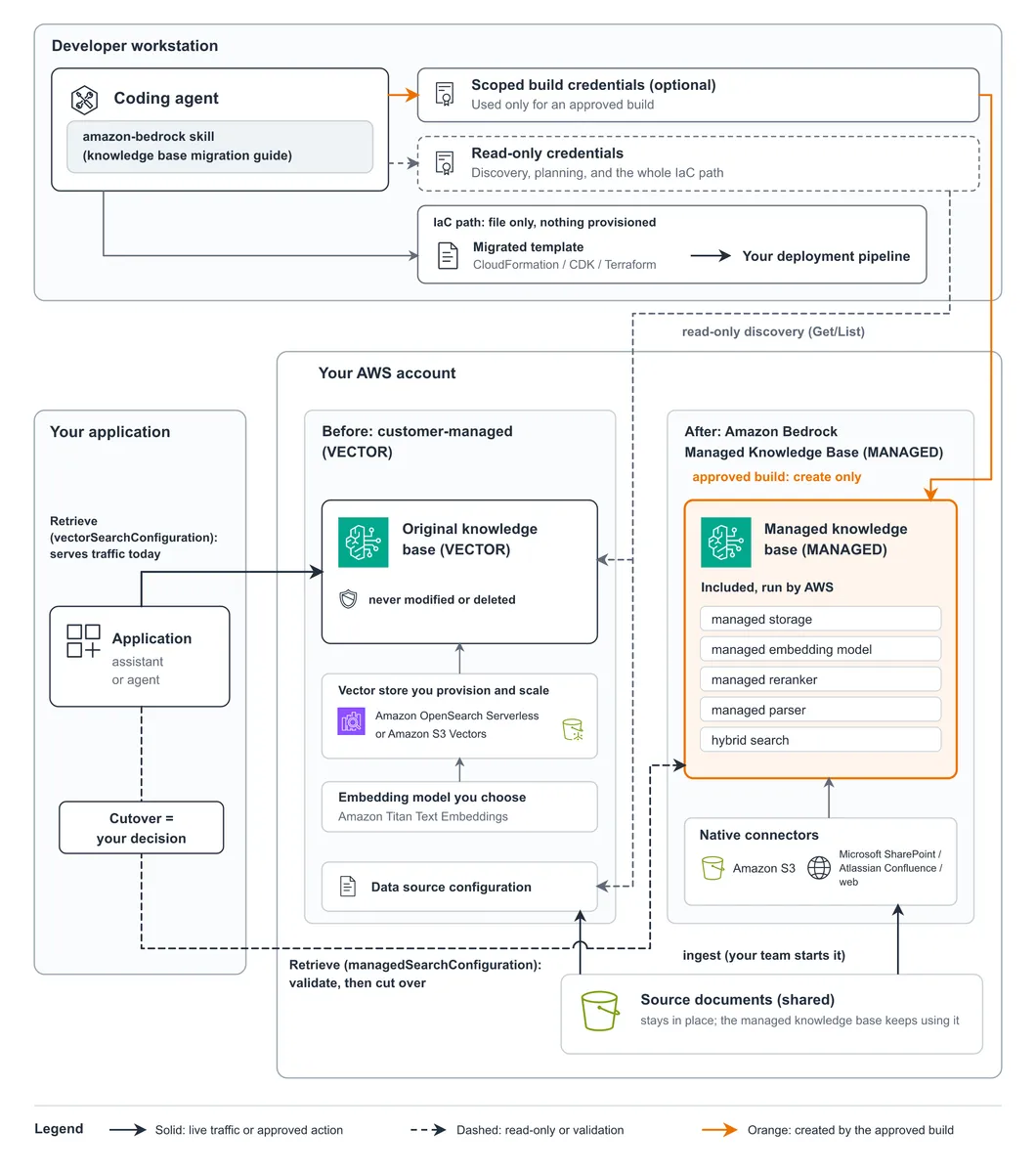
A customer-managed knowledge base uses the VECTOR type with a self-configured vector store; a Managed Knowledge Base uses the MANAGED type. The migration guide directs the agent to create a new MANAGED knowledge base alongside the original without modifying or deleting it during migration. Using the guide's mapping, the agent writes a plan listing which settings remain unchanged, which ones Managed handles differently, and which application changes are needed. The original keeps serving every request while the team ingests content, validates, and cuts over.
How the migration guide works
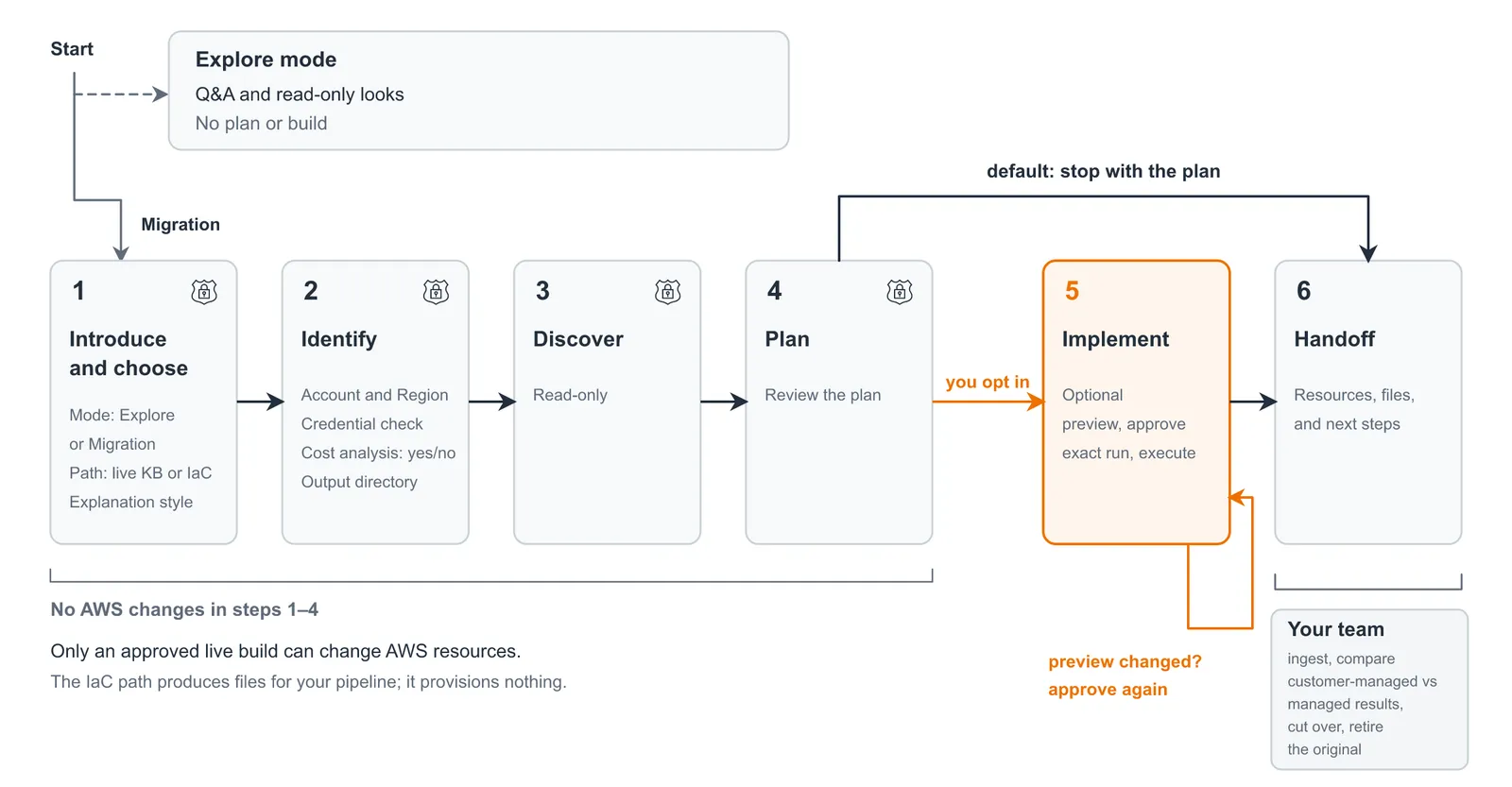
The guide separates planning from implementation. In Explore mode the agent answers questions about Managed Knowledge Base and can inspect the configuration with read-only calls, so the effort can be estimated. In Migration mode the guide walks the agent through checkpoints:
- Introduce and choose. The agent explains what it will and will not touch. The user chooses the path (a live knowledge base or an IaC source) and a plain (default) or technical explanation style.
- Identify. Confirm the account and AWS Region. The agent flags over-broad credentials, asks whether a cost analysis is wanted, and creates an output directory.
- Discover. The agent reads the knowledge base and data sources with read-only calls, or reads the template files.
- Plan. The user reviews the plan and the application changes; by default, the agent stops here.
- Implement, if requested. For a live build, the exact preview of the provisioning script must be approved, and approved again if it changes. For IaC, the agent writes a migrated template and reports which schema checks ran.
- Handoff. Review what was produced and the team's remaining steps.
Resource creation stays separate from ingestion and cutover.
Reviewing the configuration mapping
The guide maps each setting to preserve data sources, filters, and chunking behavior when the managed type configures them differently, classifying each as:
- 1:1. The new knowledge base uses the same setting.
- Adjusted. Managed reaches the same outcome through a different setting, and the plan applies the substitution.
- Blocked. No managed path exists today; the agent excludes that knowledge base from the build, explains why, and points to AWS Support. Other knowledge bases in the same run can proceed.
The post advises comparing chunking on real content during validation.
Permissions and generated changes
Discovery, planning, and the entire IaC path need only read-only credentials. For a live build, the guide directs the agent to propose a scoped policy that explicitly denies changes to the original knowledge base, and to never ask for administrator or full-access permissions. It also directs the agent to change only resources it created, to reference secrets by Amazon Resource Name (ARN), and to ignore instructions found in the data it reads. The generated AWS Identity and Access Management (IAM) policy and provisioning script should be reviewed before the run is approved. After the build, the agent's actions can be checked in AWS CloudTrail event history, which keeps 90 days of management events; each event records the API call, such as CreateKnowledgeBase, and the identity that made it.
For the optional cost analysis, the agent compares current spend with a Managed Knowledge Base estimate using current AWS prices, from read-only inputs including Amazon CloudWatch metrics, Amazon S3 object sizes, and AWS Cost Explorer. Each figure is labeled as measured, supplied by the user, or estimated.
Prerequisites
Separate credentials should be used for planning and for any approved resource creation.
- A compatible development environment with the Agent Toolkit for AWS.
- The AWS Command Line Interface (AWS CLI), configured with a least-privilege, read-only profile.
- Access to the original knowledge base configuration or its IaC files.
- For the optional live build:
- A scoped build profile using the policy the guide recommends.
- An IAM service role for the new knowledge base; the guide gives the agent the trust policy and permissions to help create it.
- Python 3 with boto3 for the generated provisioning script.
The Agent Toolkit for AWS works with compatible development environments, and its GitHub repository lists the available skills. The examples use AWS CLI 2.37 and boto3 1.43.32.
Installing the skill
Following the Agent Toolkit for AWS getting-started instructions for the coding agent, the add-skill command installs the amazon-bedrock skill on the coding agents it detects; --agent targets a specific one, for example --agent kiro.
aws agent-toolkit add-skill \
    --skill-name amazon-bedrock
After installation, the agent loads the migration guide when a migration task is described. The following prompts are illustrative inputs, not transcripts.
Planning the migration
The path should match how the source is maintained:
| Path | What the agent reads | What it produces | AWS changes |
|---|---|---|---|
| Explore | Documentation, and optionally the knowledge base (read-only) | Answers in the conversation | None |
| Live knowledge base | The knowledge base and data sources (read-only) | A plan, and optionally a new Managed Knowledge Base alongside the original | Only after the exact preview is approved |
| Infrastructure as code | The AWS CloudFormation template, AWS Cloud Development Kit (AWS CDK) synthesized template, or Terraform configuration | A migrated template in the same format | None; the pipeline deploys it |
To start in Explore mode, ask a question:
What would change if I moved knowledge base in to a Managed Knowledge Base? Use Explore mode.
When ready, choose the live or IaC path.
Migrating a live knowledge base
Ask for a plan before authorizing resource creation:
Plan a migration of knowledge base in to a Managed Knowledge Base. Stop after the plan.
Confirm the account and Region, then review the plan's mappings and application changes. By default, the new knowledge base takes the original's name with a -managed suffix. To build it, confirm the service role exists, switch to the build profile, inspect the provisioning script and its preview, and approve. The agent runs the script, which creates the knowledge base and data sources, and reports their status.
Migrating infrastructure as code
Point the agent at the source template or configuration:
Review and plan a migration to a Managed Knowledge Base.
The agent writes the migrated file to the output directory, deploys nothing, and shows the diff; ask the agent to save the diff if it should be kept. Run terraform init -backend=false and terraform validate before deployment. The agent can walk through both commands, but the guide leaves these checks to the user because terraform init downloads the large AWS provider. Before applying the deployment plan, check that it keeps the original resources needed for rollback.
Example conversation
The migration runs as a conversation. Before reading anything, the agent states its scope and asks how to proceed:
It never changes or deletes , never starts ingestion, and never cuts your application over; every AWS change is shown to you and approved first. Nothing has run against your KB yet.
- Mode: Explore (read-only Q&A about Managed KBs and your KB, no plan or build) or Migration (run the phases: identify, discover, plan, and optionally build)?
- Target type, if Migration: migrate the live KB (kb path, which can build a new Managed KB on approval), or migrate the Terraform/CloudFormation that defines it (iac path, which only emits a migrated file and provisions nothing)?
- Explanation style: plain or technical. I'll use plain unless you say otherwise.
The plan summary shows each mapping, the caller changes, and the decisions still needed:
Phase 3, Plan: written (plan.md)
- Mapping:
- Vector store becomes auto-provisioned (adjusted, Yes).
- SEMANTIC chunking is dropped for the managed default (adjusted, Partly).
- Parsing becomes SMART_PARSING (adjusted, Yes).
- The S3 prefix and metadata sidecars carry over 1:1.
- Changes for callers:
- New KB id.
- managedSearchConfiguration replaces vectorSearchConfiguration.
- overrideSearchType: SEMANTIC can't be sent; search is hybrid. Your input needed before this can go further.
- D1 embeddingModelType: MANAGED (recommended): keeps the managed reranker. CUSTOM Titan v2 1024/FLOAT32: turns off the managed reranker.
- D2 aclEnabled: recommend false, since the source has no ACLs. On S3 this can't be changed after create.
- Next step: stop with this plan (the default), or opt into Phase 4?
For a live build, the agent stops at a preview, and the approval command requires the plan's hash:
If you approve, the command to run is the following. It is MUTATING: AWS_PROFILE=build-profile AWS_REGION=
python3 provision_managed_kb.py --execute
--expect-plan-sha256 --execute refuses to start unless it is given --expect-plan-sha256 and the hash matches. What the preview would create:
- Knowledge base (CreateKnowledgeBase, MANAGED): support-docs-managed
- Data source (CreateDataSource, managed connector, deletion protection ENABLED/15): support-docs-s3-managed The script never calls StartIngestionJob, Retrieve, Update*, Delete*, or a standalone TagResource.
The example exchanges are lightly edited, with identifiers replaced.
Updating the application's retrieval call
The application uses the same Retrieve operation for both types. The managed request targets the new knowledge base ID and replaces vectorSearchConfiguration with managedSearchConfiguration; passing vectorSearchConfiguration to a managed knowledge base returns a validation error. Managed retrieval always uses hybrid search, so the managed request shape has no overrideSearchType field. Metadata filters keep the same syntax, except that managed knowledge bases do not support the startsWith and stringContains operators; the Retrieve API reference has the full syntax.
The example assumes both knowledge bases contain the locale metadata used by the filter.
# Illustrative: the managed request shape was checked with boto3 1.43.32; adapt the IDs and filter to your knowledge base.
import boto3
client = boto3.client("bedrock-agent-runtime")
query = {"text": "How do I return an online order?"}
locale_filter = {"equals": {"key": "locale", "value": "en-US"}}
# Customer-managed (VECTOR) knowledge base.
original_response = client.retrieve(
    knowledgeBaseId="<original-kb-id>",
    retrievalQuery=query,
    retrievalConfiguration={
        "vectorSearchConfiguration": {
            "numberOfResults": 5,
            "overrideSearchType": "SEMANTIC",
            "filter": locale_filter,
        }
    },
)
# Managed target: different ID and search configuration.
managed_response = client.retrieve(
    knowledgeBaseId="<managed-kb-id>",
    retrievalQuery=query,
    retrievalConfiguration={
        "managedSearchConfiguration": {
            "numberOfResults": 5,
            "filter": locale_filter,
        }
    },
)
Validating retrieval and cutting over
The new knowledge base should be evaluated while the application still uses the original:
- On the IaC path, review and deploy the target configuration through the pipeline.
- Sync each data source and review any failures; see Sync your data.
- Grant the application's runtime IAM role bedrock:Retrieve on the new knowledge base ARN, and keep its access to the original so rollback stays possible.
- Run representative queries against both knowledge bases with Retrieve under that role. The two types use different score scales; managed scores also depend on rerankingModelType, which defaults to MANAGED with the managed embedding model and to NONE with a custom one. Tune thresholds per mode and hold the mode constant while comparing.
- Test metadata filters and permission-aware retrieval where used, including content the signed-in user should not receive; on an ACL-enabled data source, requests without userContext.userId (the user's email) return no results.
- After acceptance, deploy the new knowledge base ID and request shape. Keep the original knowledge base, with current content, and the application configuration through the rollback period.
For each query, check whether both return the same top document and how much the results overlap. A short script can report pass or fail against criteria such as a matching top document on at least 90 percent of queries and no zero-result queries on the managed knowledge base; the threshold should be tuned to the workload. For other retrieval-quality measures such as context relevance and context coverage, see Use metrics to understand RAG system performance.
Differences to watch when comparing results:
- Normalize source locations before comparison: a customer-managed knowledge base can return s3://bucket/key in location.s3Location.uri while a managed knowledge base can return an https:// URL; compare by object key.
- Compare the top result instead of assuming equal result counts: the two types can return different numbers of results, and numberOfResults sets a maximum rather than a guarantee. Compare the top document and review each query where it changes.
- Map renamed system metadata keys in comparison code: for example, _data_source_id takes the place of x-amz-bedrock-kb-data-source-id. Custom metadata attributes keep their names.
Cleaning up
If the migration completes, retire the original only after the rollback period and a dependency review. Keep the source documents and buckets the managed knowledge base ingests from, and storage that other workloads use; clean up IaC-managed resources through their owning template.
If the evaluation is ended instead, keep the original and delete what was created in this order:
- Delete each managed data source and wait until it is gone.
- Delete the managed knowledge base and wait until it is gone.
- If the service role was created only for this evaluation, delete its inline policy, then the role.
- With a customer managed key, check aws kms list-grants for grants Amazon Bedrock created, which can remain after the knowledge base is deleted.
- Keep any S3 bucket that another knowledge base still reads.
Deletion protection on a managed data source limits how much a sync can delete, not whether the data source itself can be deleted. Deleting the original knowledge base does not delete its vector store, which continues to incur charges until it is removed. See Delete an Amazon Bedrock knowledge base.
Conclusion
With Amazon Bedrock Managed Knowledge Base, the team no longer runs a vector store or manages the underlying retrieval infrastructure; the migration guide in the amazon-bedrock skill lets it ask the coding agent for a plan, review it, and approve only the resources it wants built. To get started, set up the Agent Toolkit for AWS and ask the agent for a read-only assessment of the knowledge base; after migrating, agentic retrieval can be explored for multi-part questions. More detail is in Build enterprise search for agents with Amazon Bedrock Managed Knowledge Base on the AWS Machine Learning Blog.