closed is a desktop AI agent for mechanical mould design, introduced through a Show HN post published on 12.11.2026 that points to closed.sh. Its site opens with a 45-second film that walks through the problem, the way the tool works and the desktop app, and the product tour is framed around a sample job that uses fictional data.
How a job runs
A job begins when the user uploads the customer's STEP file, or a photo of the part when no CAD model is available. From there, closed reads the geometry, keeps the customer's part locked and starts designing the mould around it.
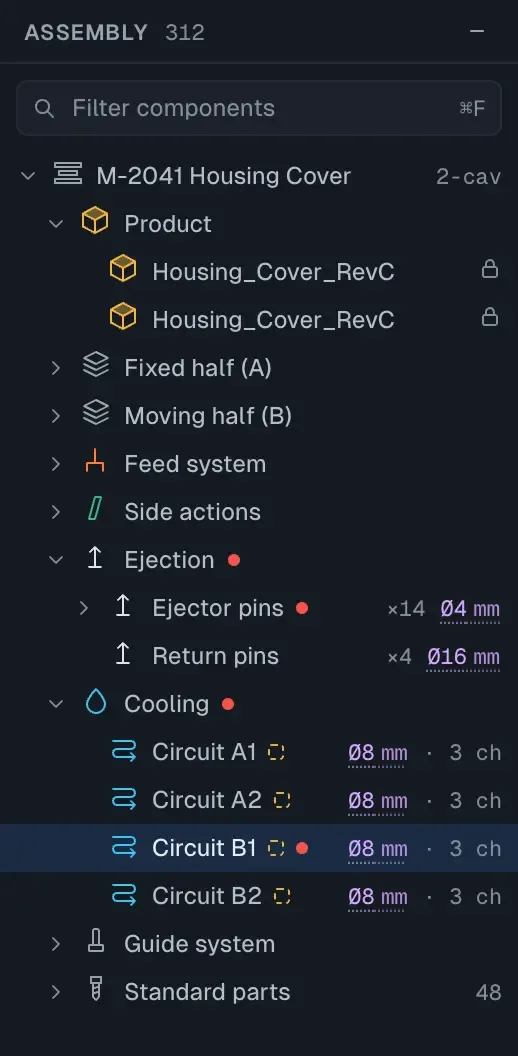
In the illustrated sample job, M-2041, the assembly tree shows the customer's part, Housing_Cover_RevC, locked under Product while the mould's halves, feed, ejection and cooling are built around it.
The agent then drafts every stage of the design: parting, core and cavity, layout, mould base, feed, side actions and ejection. Each stage is logged with a summary of what it did and how long it took, so a run can be reviewed like a build.
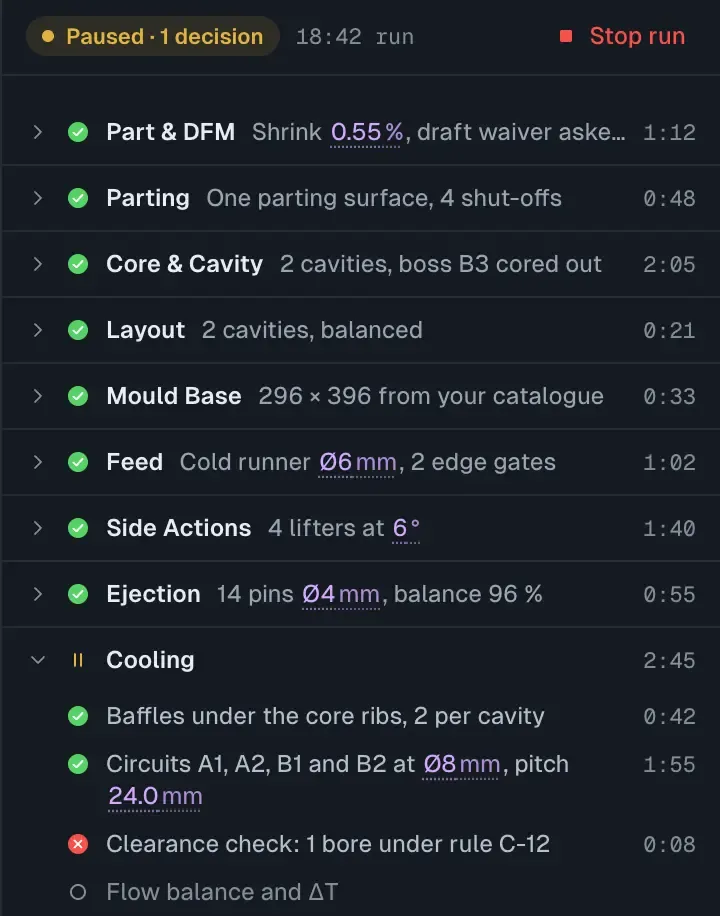
In the sample run, the stages from Part & DFM through Ejection are complete, and Cooling has paused after a clearance check flagged one bore under rule C-12.
Human checkpoints
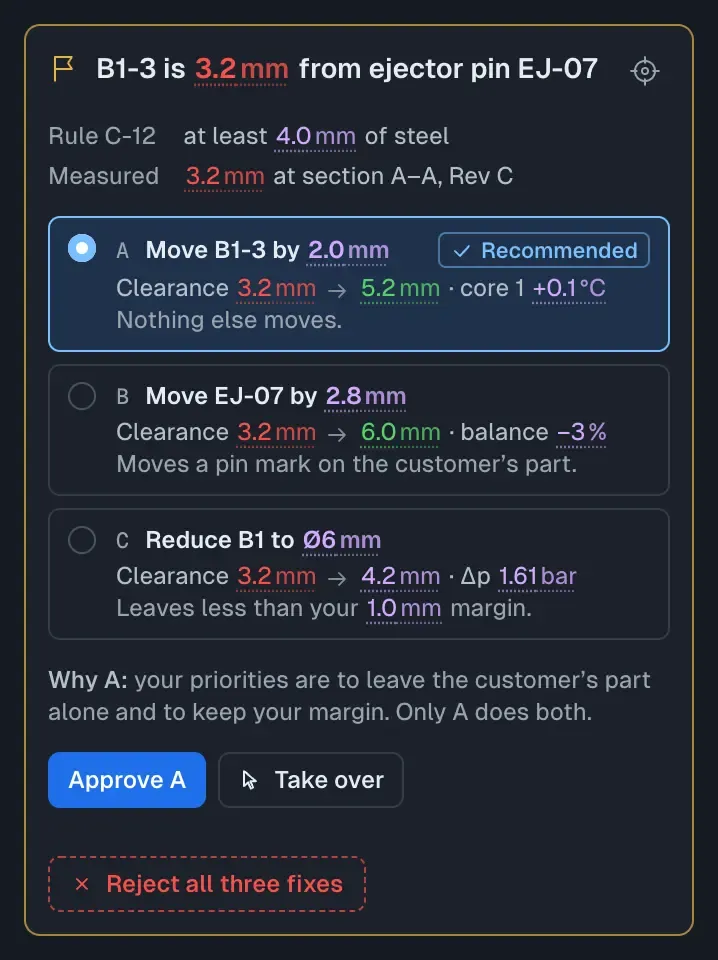
The agent stops when a decision belongs to the user. In the site's example, bore B1-3 runs 3.2 mm from ejector pin EJ-07 while the shop's rule asks for 4.0 mm. Rather than choosing quietly, closed sizes three fixes — moving B1-3 by 2.0 mm, moving EJ-07 by 2.8 mm or reducing B1 to Ø6 — recommends the first, and waits. The Reject option, which dismisses all three fixes, sits on its own row apart from Approve, on purpose.
Where the numbers come from
Any number in the interface can be clicked to reveal its source and its working. A dimension in closed comes from one of six places — measured by the CAD kernel, taken from the shop's rulebook, drawn from the standard-parts catalogue, calculated by the solver, supplied by the customer's drawing or datasheet, or typed in and signed by the user — and the AI itself is never a source.
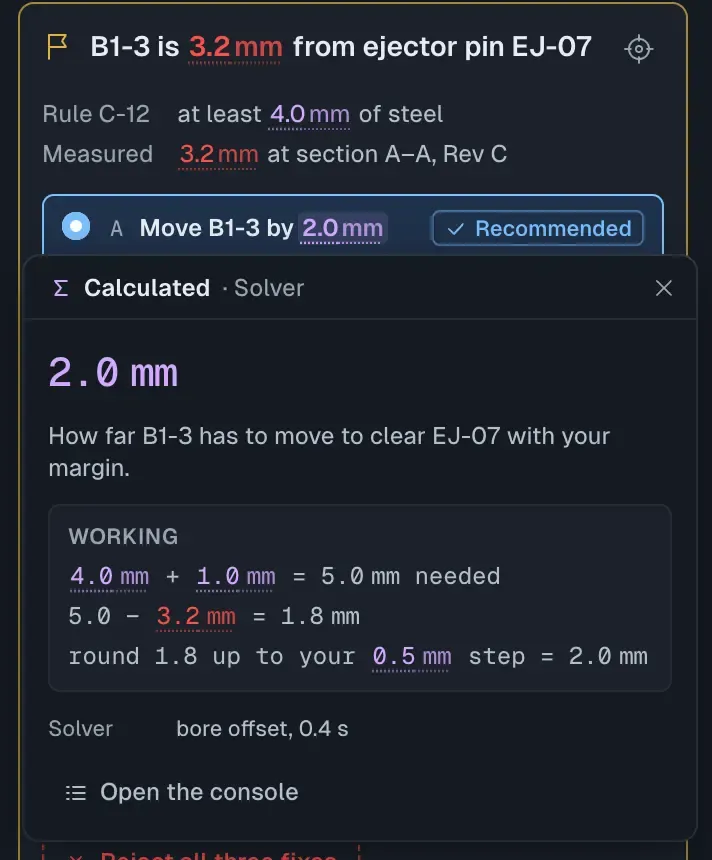
The solver's workings are shown explicitly: for the B1-3 fix it reports that 4.0 mm plus 1.0 mm makes 5.0 mm needed, that 5.0 minus 3.2 mm leaves 1.8 mm, and that rounding up to the shop's 0.5 mm step gives 2.0 mm.
Taking over
Agent and manual mode work on the same model, so the user can take over at any point and hand control back afterwards. Changing a value updates the associated check as the user types, and the agent resumes from the edit. The viewport rotates and pans like NX, SOLIDWORKS or Creo, whichever the user is used to.
Approval before release
Nothing ships until the user approves it. Every stage ends with a list of what changed and who changed it, the customer's part stays locked throughout, and release waits for the user's sign-off.
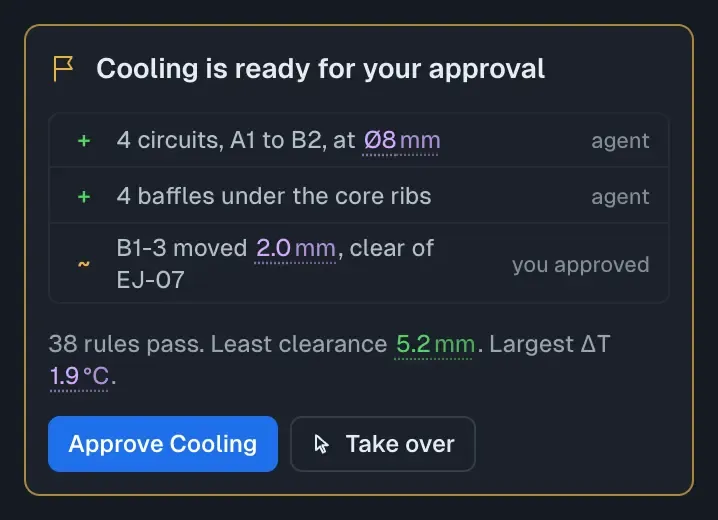
In the sample stage review, the Cooling stage awaits approval: the agent added 4 circuits at Ø8 and 4 baffles, B1-3 was moved 2.0 mm with the user's approval, and 38 rules pass.
Why it is being built
The developer frames the project around two problems: mould design still eats nights, and AI tools ask users to trust numbers they cannot check. closed is described as working the other way round — it does the drafting, shows where every dimension came from, and changes nothing without the user. The developer says they would like to build it together with people who design moulds, and can be followed on X at @ironfisto.
Availability
The studio is planned for macOS and Windows, with companion apps for iOS and Android, all marked as coming soon. Builds go to the waitlist first, so there is nothing to download yet; the site only offers to notify subscribers when closed can be tried on their own jobs.