What it does
agent-access-review is an open-source command-line tool, published under the MIT license by GitHub user Mihirajmera, that applies the user access review process to AI agents. It inventories every agent and MCP server an organization runs, determines what each one can read, write, execute and send, tests that access against a control catalog, and produces the packet an auditor expects: a reviewer sign-off sheet, hashed evidence and OSCAL assessment results mapped to NIST 800-53, SOC 2, the NIST AI Risk Management Framework and the OWASP Top 10 for LLM Applications.
The author sums it up as the quarterly "who has access to what?" review that companies already run for employees, applied to AI agents. As a real-world case study, the project reports what results from copying the MCP configurations shown in official READMEs: 8 of 9 packages unpinned, 7 of 9 holding unreviewed write, send or execute access, and an exfiltration path once the grants are combined.
Quick start
The tool requires Python 3.11 or newer. No cloud account, API keys or network access is needed.
pip install agent-access-review
agent-access-review demo
The demo reviews five example agents and writes the packet to review-demo/; the report itself is review-demo/access-review.md, and a sample report is also committed in the repository.
To review a real setup, point the scan at a config file:
| Tool | Where its MCP config lives | Command |
|---|---|---|
| Claude Desktop (macOS) | ~/Library/Application Support/Claude/claude_desktop_config.json | agent-access-review scan ~/Library/Application\ Support/Claude/claude_desktop_config.json |
| Claude Desktop (Windows) | %APPDATA%\Claude\claude_desktop_config.json | PowerShell: agent-access-review scan "$env:APPDATA\Claude\claude_desktop_config.json" |
| Cursor | ~/.cursor/mcp.json (global) or .cursor/mcp.json (project) | agent-access-review scan ~/.cursor/mcp.json |
| VS Code | .vscode/mcp.json in a project | agent-access-review scan .vscode/mcp.json |
| Your own agents | an agents.yaml you maintain | agent-access-review scan agents.yaml |
Secrets found in the configs are masked before anything is written, so the output is safe to share.
Key terms
- AI agent: an AI model that can take actions through tools: reading files, querying databases, sending email or running commands.
- MCP (Model Context Protocol): the standard way applications such as Claude Desktop, Cursor and VS Code plug tools into an AI. Each MCP server in a config is one tool the agent can use.
- User access review (UAR): the periodic check in which each person's access is listed, an owner confirms it is still needed and the rest is revoked; auditors test it under SOX and SOC 2.
- ITGC: IT General Controls, the baseline controls (access, change management, operations) that auditors test for financial reporting.
- Non-human identity: an account used by software rather than a person: service accounts, API keys and now AI agents.
- Exfiltration path: a route for data to leave the organization; here, an agent that can read sensitive data, reads content an attacker can write and can send data out.
- Prompt injection: hiding instructions in content an AI reads (an email, web page or ticket) so it does something its user never asked for.
- OSCAL: NIST's machine-readable format for security controls and assessment results, which lets GRC tools import findings automatically.
The problem
Every SOX and SOC 2 program runs quarterly user access reviews: list who has access to what, have an owner confirm it is still needed, revoke the rest and keep the evidence. AI agents now hold the same kind of access (API tokens, database connections, shell access, mailboxes) and almost nobody reviews them. The README lists four gaps:
- No owner, no approval. A developer adds an MCP server to a Claude Desktop or Cursor config and the agent immediately has that person's GitHub token and home directory: no ticket, no approver, and it never appears in an access review.
- Over-broad by default. Setup guides tell people to grant the whole home directory, the full-control repo scope or tenant-wide *.All Microsoft Graph permissions.
- Secrets in plain text. MCP configs routinely hold raw tokens and database passwords.
- A new attack path. An agent that can read sensitive data, reads content an attacker wrote (a GitHub issue, an email, a web page) and can send data out can be prompt-injected into leaking that data; no traditional access control examines that combination.
The author's premise is that agents are non-human identities: they need the same joiner/mover/leaver and recertification controls as people, plus a few specific to AI.
The control catalog
The overview text describes the review as testing access against 12 controls, while the catalog itself and the tool's architecture list 14 checks, numbered AAR-01 through AAR-14:
| ID | Control | Severity | Frameworks |
|---|---|---|---|
| AAR-01 | Every agent has an accountable human owner | high | NIST 800-53 AC-2 · SOC 2 CC6.2 · AI RMF GOVERN 2.1 |
| AAR-02 | Access is approved and recertified within 90 days | high / medium | AC-2 · CC6.2, CC6.3 |
| AAR-03 | Privileged actions (write, delete, send) need human approval | high / medium | AC-6 · CC6.3 · AI RMF MAP 3.5 · OWASP LLM06 |
| AAR-04 | Least privilege: no home directories, wildcards, admin or tenant-wide scopes | high | AC-6 · CC6.3 · LLM06 |
| AAR-05 | Code and shell execution is sandboxed | high | CM-7, AC-6 · LLM05, LLM06 |
| AAR-06 | No hardcoded credentials | high | IA-5 · CC6.1 |
| AAR-07 | Credentials rotated within 90 days | medium / low | IA-5 · CC6.1 |
| AAR-08 | Dormant access removed after 90 days | medium / low | AC-2(3) · CC6.2 |
| AAR-09 | No exfiltration path (sensitive data + untrusted input + egress, with no human gate) | high | AC-4 · AI RMF MEASURE 2.7 · LLM01, LLM02 |
| AAR-10 | Tool packages pinned to a version or image digest | medium | SR-3 · LLM03 |
| AAR-11 | Remote MCP servers use HTTPS | high | SC-8 · CC6.7 |
| AAR-12 | Every tool's capabilities are inventoried | medium | CM-8 · AI RMF GOVERN 1.6 |
| AAR-13 | No deprecated or archived MCP servers (names the maintained replacement) | high | SA-22, SI-2 · CC7.1 · LLM03 |
| AAR-14 | No MCP server versions with known vulnerabilities, and no packages published as malware (from an OSV snapshot) | high / medium / low | RA-5, SI-2 · CC7.1 · LLM03 |
Each control is defined once in controls.yaml and cross-walked to every framework, so one test produces evidence for all of them. The author states that the framework mappings are their own judgment and should be checked against official crosswalks before being relied on in a real audit.
Exfiltration paths: the AI-specific risk (AAR-09)
Traditional access reviews examine one permission at a time. For AI agents, the danger is a combination: an agent that can read sensitive data, reads content an outsider wrote and can send data out. Each leg is harmless alone; together, a single prompt injection hidden in an email, ticket, issue or web page can instruct the agent to leak the data. A human approval step on any leg breaks the chain.
The README illustrates this with two example agents. finance-ops-agent is flagged: anyone can email its accounts-payable inbox (untrusted input), it reads restricted NetSuite vendor bills, and it can send email to any recipient with no human approval. support-copilot passes: it reads customer tickets and confidential ticket history, but a human approves each drafted reply before it is sent to the customer.
AAR-09 maps to OWASP LLM01 (prompt injection) and LLM02 (sensitive information disclosure), NIST 800-53 AC-4 (information flow enforcement) and NIST AI RMF MEASURE 2.7 (AI security and resilience).
How it works
- Discover. Point it at files or folders. It reads two formats: MCP configs (Claude Desktop, Cursor, VS Code .vscode/mcp.json), covering local npx, uvx or docker servers and remote HTTP servers (these carry no owner or approval, which the author says is exactly why they are the shadow-AI problem), and agent manifests (agents.yaml), a governed record for LangChain, CrewAI or custom agents with owner, approval, tools, scopes, credentials and last-used dates.
- Classify. An MCP config says which server runs, not what it can do; the capability catalog turns a server name into a grant: actions, data classification, whether it ingests untrusted content and whether it can send data out. Unknown servers are flagged under AAR-12 and never assumed safe.
- Redact, then hash. Secrets are masked during parsing, before anything is stored, so evidence can be shared with auditors. Each agent's inventory and redacted source record is hashed with SHA-256 over canonical JSON, making any later edit to the evidence detectable.
- Review. Every tool grant gets a recommended decision (Keep, Modify, Revoke or Investigate) plus an empty column for the reviewer, the same shape as a user access review spreadsheet.
- Export. The tool emits OSCAL 1.1.2 assessment results: one observation per agent pointing at its evidence file and hash, and one finding per NIST 800-53 control objective.
The review cycle mirrors the quarterly user access review that SOX and SOC 2 auditors already test for people: discover configs and manifests, classify through the capability catalog, test the controls, let each owner review every tool grant, keep the hashed evidence and OSCAL output for grants marked Keep, open a remediation ticket and re-scan for Modify or Revoke, then recertify every 90 days.
| User access review (people) | Agent access review (this tool) |
|---|---|
| HR feed lists every employee | Configs and manifests list every agent and MCP server |
| Manager confirms each entitlement | Agent owner marks each tool grant Keep / Modify / Revoke |
| Terminated users removed | Unowned agents flagged (AAR-01), unused tools revoked (AAR-08) |
| Privileged access gets extra scrutiny | Write, send, delete and shell access need a human gate (AAR-03, AAR-05) |
| Screenshots and spreadsheets as evidence | Hashed JSON evidence and OSCAL output |
Sample run
The bundled examples are a developer's Claude Desktop config, a VS Code MCP config and three governed agents; the full output is committed in sample-output/: the reviewer packet, the decision sheet, hashed evidence and OSCAL. Running the demo produces:
$ agent-access-review demo
AGENT                        TOOLS  HIGH   MED   LOW
support-copilot                  2     0     0     0
finance-ops-agent                4     4     3     0
devops-agent                     2     6     1     1
claude-desktop-config            6    12     5     1
vscode-mcp                       3     6     2     3
5 agents · 17 tool grants · 44 findings
By severity, the findings split into 28 high, 11 medium and 5 low. The controls that fail most often across the five agents:
| Control | Agents failing |
|---|---|
| AAR-02 · Approved and recertified within 90 days | 4 / 5 |
| AAR-03 · Human approval for privileged actions | 4 / 5 |
| AAR-08 · Dormant access removed | 4 / 5 |
| AAR-01 · Accountable owner | 3 / 5 |
| AAR-04 · Least privilege | 3 / 5 |
| AAR-09 · No exfiltration path | 3 / 5 |
| AAR-05, 06, 07, 10, 12 | 2 / 5 each |
| AAR-11, 13, 14 | 1 / 5 each |
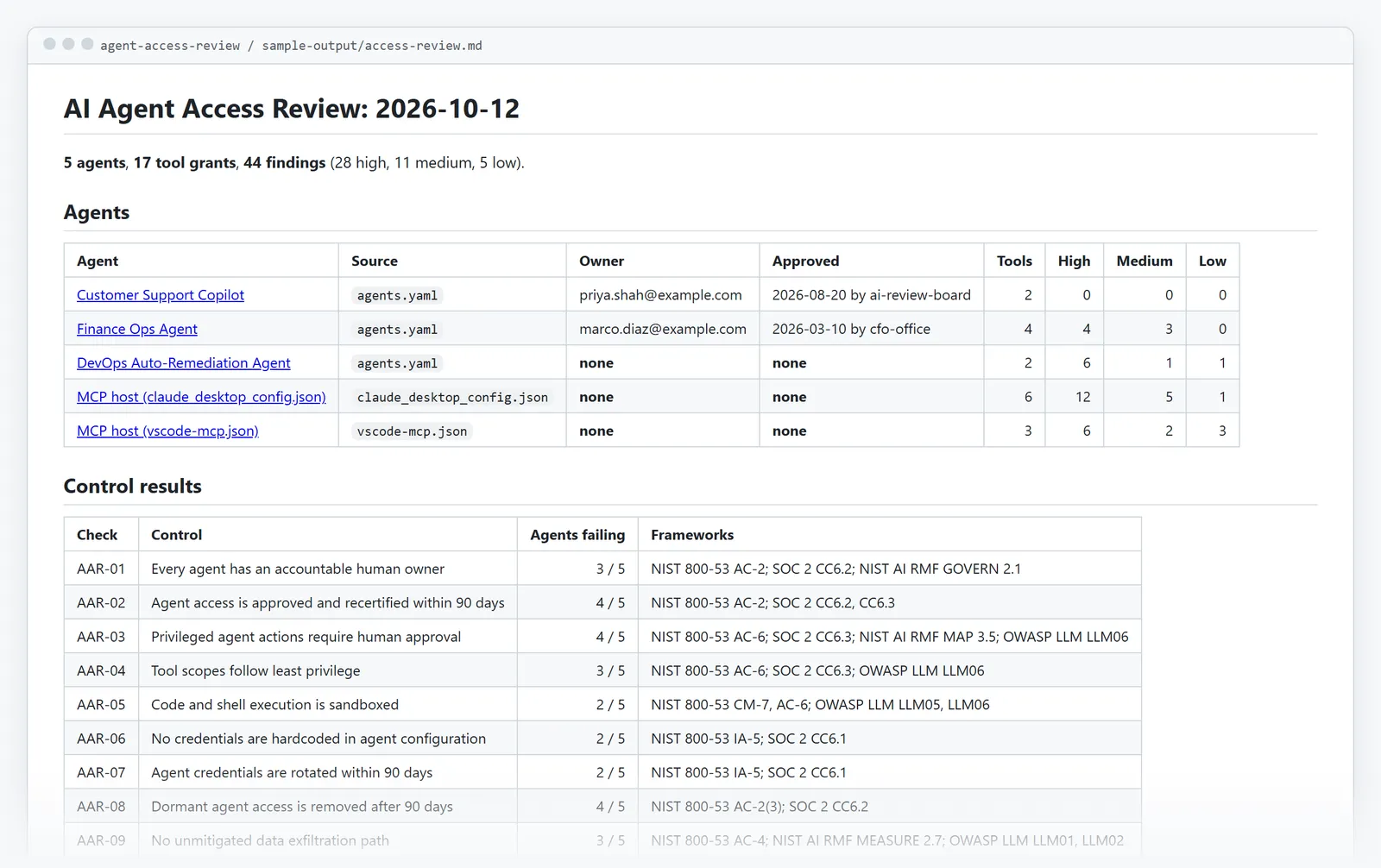
An excerpt from the reviewer packet for finance-ops-agent:
| Tool | Actions | Data | Recommended | Reviewer decision |
|---|---|---|---|---|
| netsuite | read, write | restricted | Modify | ☐ Keep ☐ Modify ☐ Revoke |
| outlook | read, send | confidential | Modify | ☐ Keep ☐ Modify ☐ Revoke |
| sharepoint | read | confidential | Modify | ☐ Keep ☐ Modify ☐ Revoke |
| expense-ocr | read | confidential | Revoke | ☐ Keep ☐ Modify ☐ Revoke |
| Check | Severity | Finding |
|---|---|---|
| AAR-09 | high | Exfiltration path: reads sensitive data, ingests untrusted content (outlook) and can send data out (outlook) with no human approval. |
| AAR-03 | high | netsuite can write restricted data without a human approving each action. |
| AAR-03 | high | outlook can send confidential data without a human approving each action. |
| AAR-04 | high | Over-broad access on sharepoint: Sites.Read.All. |
| AAR-02 | medium | Access was last approved 216 days ago by cfo-office (limit 90). |
| AAR-07 | medium | netsuite.NETSUITE_TOKEN was last rotated 315 days ago (limit 90). |
| AAR-08 | medium | expense-ocr has not been used for 164 days. |
In the sample findings, finance-ops-agent reads vendor bills in NetSuite (restricted data), reads an inbox vendors can email (untrusted input) and can send email (egress) with no human approval: an AAR-09 path, meaning one crafted invoice email could get the agent to mail out vendor banking details. Its approval is 216 days old and its OCR tool has not been used in 164 days, so it is marked Revoke. The claude-desktop-config example gives an agent the whole /Users/dev home directory, an unsandboxed terminal, a GitHub token and a database password in plain text, and runs four unpinned packages. support-copilot passes every check: it writes to tickets, but a human approves before anything is sent. CI regenerates sample-output/ on every push and fails if it differs from what is committed, so the sample always matches the current code.
How to read the results
Each tool grant receives one recommended decision, recorded in the packet and the CSV:
| Decision | Meaning | What the owner does |
|---|---|---|
| Keep | No findings on this tool | Confirm it is still needed and sign off |
| Modify | The access is needed but unsafe as configured | Narrow scopes, add human approval, move secrets to a vault, pin the version |
| Revoke | Unused for 90+ days | Remove it; re-request if it is needed again |
| Investigate | The tool is not in the capability catalog, so its access cannot be judged | Find out what it can do, then add it to catalog.yaml |
Severity is defined as follows: high means fix before the agent's next use (an unowned agent, plaintext secrets, an exfiltration path); medium means fix within the review cycle (a stale approval, an unpinned package); low means a gap in evidence rather than a risk (no usage logs, no rotation date). The reviewer fills in the empty Reviewer decision column and the sign-off table; the completed packet plus the hashed evidence files are the audit evidence for the review.
Running it
Besides installing a release with pip, the tool can be run from source, with dependencies pinned exactly in requirements.txt:
git clone https://github.com/Mihirajmera/agent-access-review.git
cd agent-access-review
python -m venv .venv && source .venv/bin/activate     # Windows: .venv\Scripts\activate
pip install -r requirements.txt
python -m agent_access_review demo                    # writes review-demo/
pytest -q
The scan command supports --out DIR (default review/), --as-of YYYY-MM-DD (the date used for recertification, rotation and dormancy checks) and --fail-on high|medium|low (exit 1 if a finding is at or above that severity). agent-access-review --help lists examples.
As a CI gate
MCP configs and agents.yaml can live in the repository so pull requests that give an agent unpinned, archived, vulnerable or over-privileged access are blocked:
# .github/workflows/agent-access.yml
on: pull_request
permissions:
  contents: read
jobs:
  review:
    runs-on: ubuntu-latest
    steps:
      - uses: actions/checkout@v4
      - uses: Mihirajmera/[email protected]   # or a commit SHA
        with:
          paths: .mcp.json .vscode/mcp.json agents.yaml   # files or folders; default "."
          fail-on: high                                    # high | medium | low | never
The review packet goes into the job summary and the step fails on findings at or above the fail-on threshold. A repository with no configs gets a notice instead of a failure. The report output holds the packet's path, so the folder (default agent-access-review/) can be uploaded as an artifact. The author recommends pinning the action to a release tag or a commit SHA rather than main so a new version cannot change the gate without review, describing this as control AAR-10 applied to the tool itself. Without the action, pip install agent-access-review followed by agent-access-review scan ... --fail-on high does the same thing.
Design decisions
- Agents are identities, not apps. The review is modeled on ITGC user access reviews (owner, approval, recertification, dormancy, credential hygiene) because that is the control framework auditors already test; AI-specific risks are added on top, not instead.
- AAR-09 looks at combinations, not single permissions. Each leg of an exfiltration path is harmless alone; the risk only appears when one agent holds all three, which is why traditional permission reviews miss it. A human approval step on the untrusted-input or egress leg breaks the chain.
- Fail closed on unknown tools. An unclassified MCP server is a finding, not a pass; because the catalog is data, a GRC team can extend it without touching code.
- Redact before hashing. Evidence containing secrets cannot be shared, and redacting afterwards would break the hash, so redaction happens in the parser.
- Docker tags count as unpinned. Only an image digest is immutable; :v1.0 can be re-pushed.
Limitations
- It reviews configuration, not runtime behavior: it sees that an agent can send email, not what it actually sent. Usage dates come from the manifest, which in production would be fed from tool-call logs.
- The capability catalog is approximate: it describes what a server can do by default, and a token's real scopes (for example, a fine-grained GitHub PAT) can be narrower; the manifest format lets users record exact scopes.
- JSON-with-comments configs are skipped with a warning.
What the author would do at enterprise scale
- Discover from endpoints, not files: collect MCP configs from managed laptops through MDM or EDR, and agent identities from the IdP (service principals, OAuth apps), so shadow agents surface automatically.
- Feed usage from logs: populate last_used from MCP gateway or proxy logs so AAR-08 is evidence-based rather than self-reported.
- Run the review in the GRC platform: push the decision sheet into ServiceNow GRC or SailPoint as a certification campaign with owners, due dates and escalation, and auto-revoke grants that are not certified.
- Close the loop: turn not-satisfied OSCAL findings into POA&M items with owners and due dates.
According to the README, the easiest way to contribute is adding an MCP server to the capability catalog (see CONTRIBUTING.md); changes are listed in the CHANGELOG, and the project is released under the MIT license.